Executive summary
Field work that does not stop when the signal does.
A global manufacturer of fire and explosion protection systems services the equipment it builds: suppression and detection across spray dryers, baghouses, cyclones and bagging lines inside industrial plants. Its engineers work in places where connectivity is unreliable by nature, and the inspection they carry out is long, structured and highly detailed.
Salesforce Field Service is the system of record for that work, but its standard offline capability could not carry this inspection. iTechCloud Solution built a browser extension that acts as an offline-first field client: it caches the work order and everything under it, lets an engineer complete the whole visit with no connection at all, records every change as a durable transaction, and synchronises those transactions back to Salesforce when the connection returns.
The principle behind it is store, work offline, queue, reconnect, synchronise, reconcile. Salesforce stays authoritative throughout. The extension is a temporary execution layer, never a second system of record.
- Client
- A global manufacturer of fire and explosion protection systems (anonymised)
- Industry
- Manufacturing: industrial fire suppression, detection and explosion protection
- Users
- Service engineers on site, subcontract engineers with no Salesforce licence, service managers, and the customer representative who signs the report
- Platform
- Salesforce Field Service, a Chrome Manifest V3 extension with a background service worker, local storage and an API management layer
- Scope
- Offline work orders, zone status, assets and sub-assets, hardware checklists, historical readings and charts, offline report generation with signature, file-based handoff, transaction queue and synchronisation
- Engagement
- Product build with ongoing managed services
The situation
The inspection did not fit standard offline.
This is not a job with a handful of fields. A single service visit covers several process zones, each with its own assets, each asset with sub-assets, and each of those with a hardware checklist whose columns differ by equipment type. The engineer needs all of it on one screen, on a tablet, in a plant.
Too many fields, too much structure
A work order carries zone status, service status, system status and interlock status per zone, then asset records, then checklist rows per asset. Standard offline handles simple records well; it was not built for a deeply nested inspection captured in one sitting.
Fields that depend on other fields
Which checklist columns apply depends on the equipment type selected, and which records can be chosen depends on the zone and asset above them. The form has to rebuild itself as the engineer works, offline, without a round trip.
Many records created at once
An engineer adds several assets and their checklists during one visit. Creating them one at a time, each waiting on a connection, is not how the work actually happens.
No connectivity where the work is
Plant floors, basements and remote sites do not have reliable signal. A client that needs a live request for every read and every write stops being usable exactly where it is needed.
Engineers without Salesforce licences
Some of the people collecting this data are subcontractors who do not have, and do not need, a Salesforce login. They still have to complete the same structured inspection.
The report is part of the visit
The customer expects a service report before the engineer leaves, and expects to sign it. Producing that document after the fact, back in the office, is a different and worse process.
Our approach
A durable queue, not an offline cache.
The decision that shaped the build was to treat every offline change as a transaction rather than as an unsaved form. A cache tells you what the data looked like; a queue tells you what was attempted, what succeeded, and what still needs attention. That distinction is what makes offline work safe to rely on.
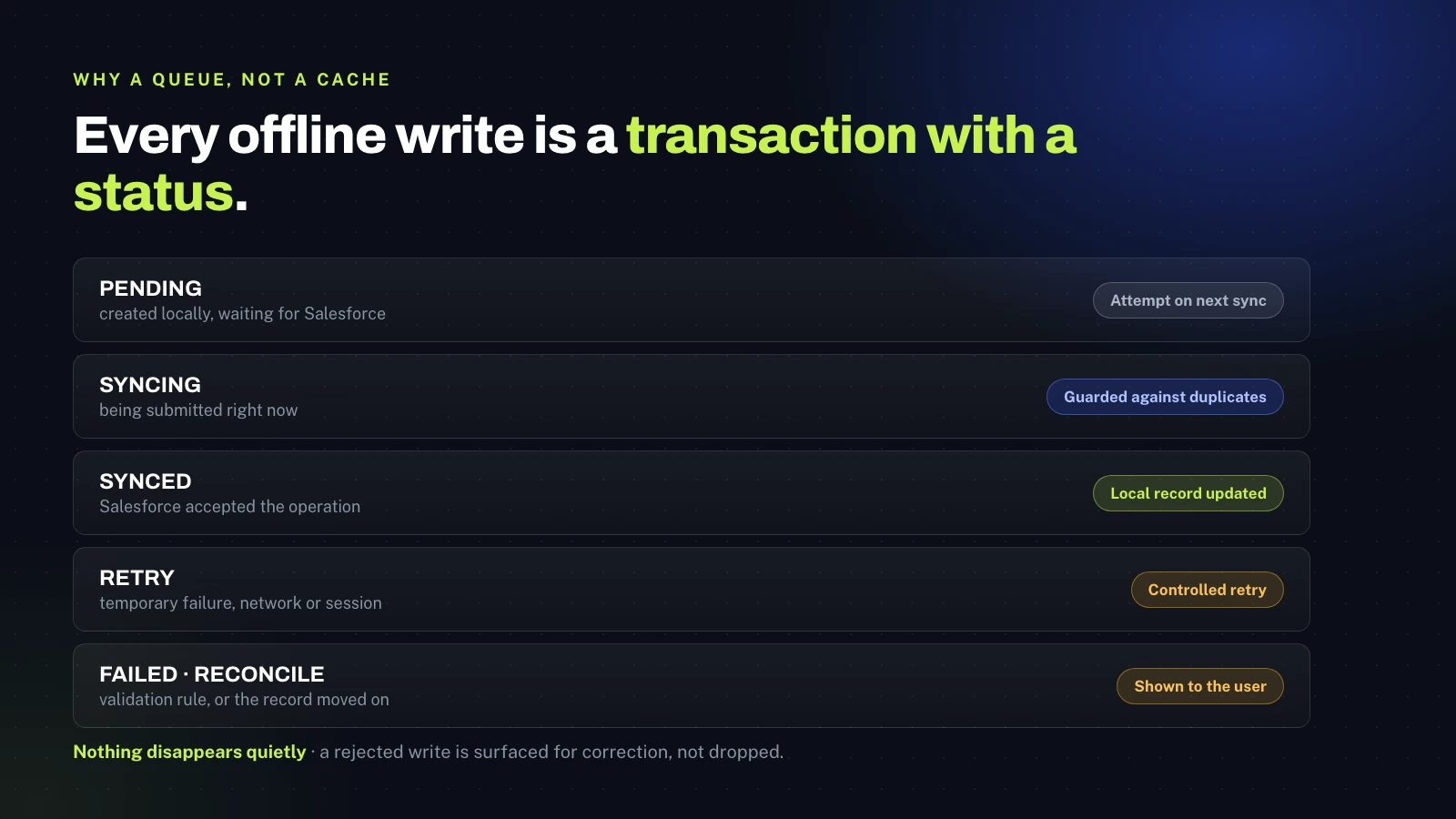
While online, the extension pulls the work order and everything beneath it and stores it locally with its identifiers and synchronisation metadata. The user interface then reads from local state, not from the network, so losing the connection changes nothing about what the engineer can do. Each edit updates the local record immediately and adds a pending transaction to a durable queue that survives the tab being closed or the browser restarting.
When connectivity returns, a background service worker works through the queue in order: it checks a Salesforce session exists, submits each operation through a single API management layer, interprets the response, marks accepted operations as synced and writes authoritative values and record IDs back into local state. A temporary failure keeps its place and is retried. A validation or business-rule rejection is marked failed and shown to the user with its reason, because the one thing an offline client must never do is lose work quietly.
Offline is easy until something fails. The whole design question is what happens to a change that Salesforce refuses three hours after the engineer typed it, and the only acceptable answer is that somebody is told.
Subhash Panchani, CEO & Co-Founder, iTechCloud Solution
Because a local working copy and the system of record can drift apart, the design sets an explicit conflict policy rather than leaving it to chance: apply the queued update where only the offline user changed the record, compare against the local base version where the server moved on, refuse to silently overwrite a field changed in both places unless the business rule allows it, merge at field level only where that is safe, and return a reconciliation error where the record was closed or deleted online.
What we built
The whole visit, on a tablet, with no connection.
Every zone, asset and checklist in one view
The engineer opens the work order and sees the whole job: the key information, a zone status table covering next service due date, zone, service, system and interlock status with remarks, and then each zone expanded into its assets. Every asset carries its own identifiers, equipment type, size, serial number, customer tag and power details, and under it a hardware checklist whose columns follow the equipment type. Sub-assets nest beneath their parents, and a comment list offers the standard fault descriptions for that equipment rather than leaving the engineer to free-type them. New assets and new checklists are created in place, several in a visit, without waiting for anything.
Changed values are highlighted as the engineer works, so at a glance it is obvious what this visit has altered and what was carried in from the last one.
Last visit, and the trend behind it
Previously synchronised data stays available offline, which means the engineer is not working blind. They can see what the readings were at the last service and open a historical chart per asset to see the trend across visits, on site, in the moment they need it to decide whether something is drifting.
The report, signed before anyone leaves
The service report is generated on the device, offline, in several depths: a short report, a medium report and a full report, with options for working hours only and for starting each zone on its own page. The customer reviews it and signs it there and then, and the signed document uploads to Salesforce with the rest of the visit once the connection returns.
A work order that travels as a file
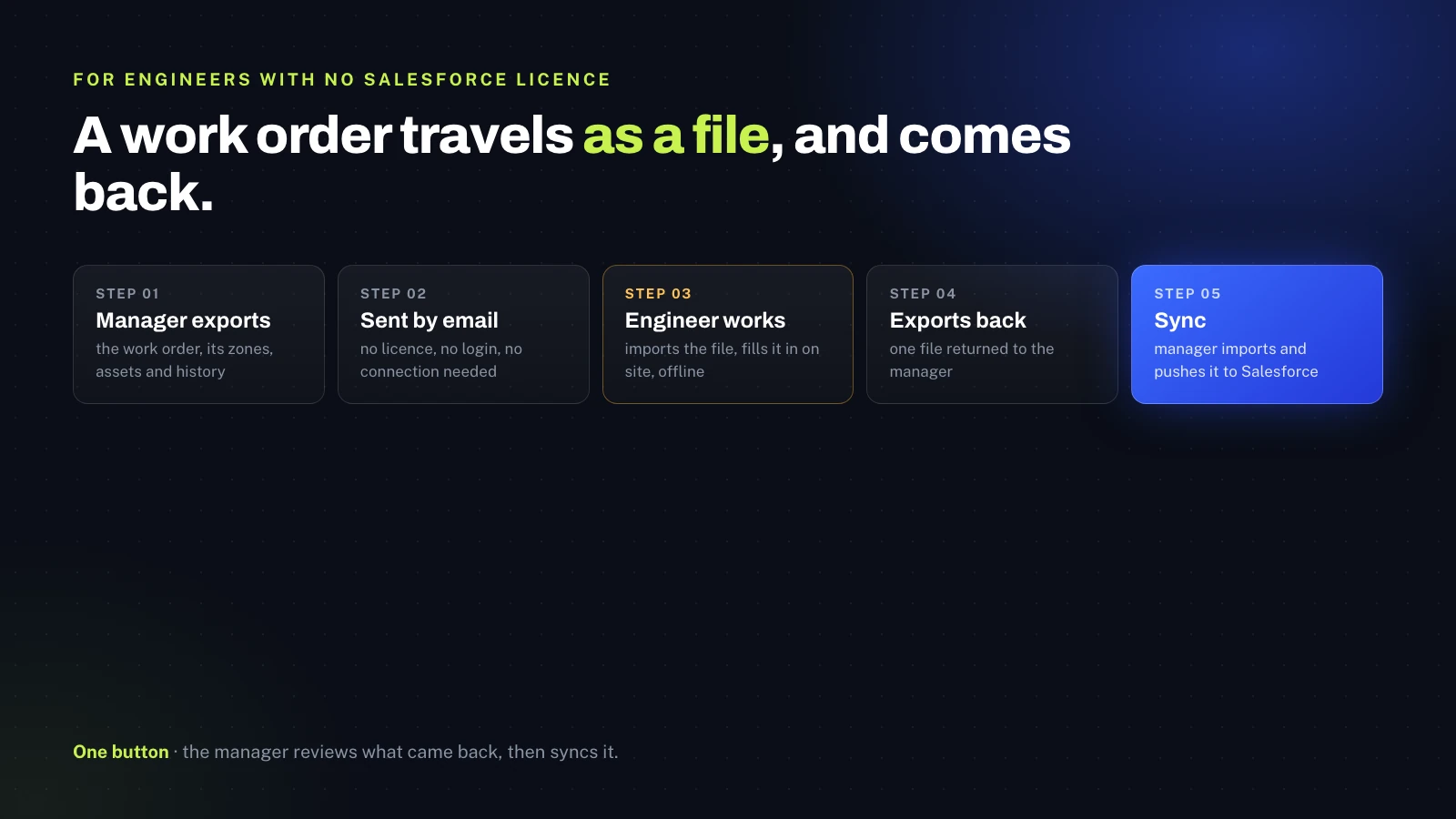
For engineers without a Salesforce licence, the work order moves as a file. A manager exports the work order with its zones, assets and history and emails it. The engineer imports that file into the extension, completes the inspection offline exactly as a licensed user would, and exports it back. The manager imports the returned file, reviews what came in, and pushes it to Salesforce with one sync action. Nobody is asked to buy a licence to fill in a checklist, and nobody re-keys a paper form.
Synchronisation the user can see
Synchronisation state is surfaced rather than hidden: online and synced, offline with the time of the last successful sync, a count of pending changes, syncing in progress, a sync error that needs attention, and a reconciliation state where local and server versions need review. The engineer always knows whether their morning is safely in Salesforce or still sitting on the tablet.
The outcome
Connectivity stopped being a precondition for doing the work.
The visit completes on site
Zones, assets, sub-assets and hardware checklists are all captured during the visit, on the tablet, whether or not there is a connection, instead of being written down and re-entered later.
Nothing is lost
Every change is a durable transaction rather than an unsaved form, so closing the tab, restarting the browser or losing the network mid-operation does not cost the engineer their work.
Failures surface
A rejected write is retained with its reason and shown, so a validation rule or a record that moved on becomes something to correct rather than something that silently vanished.
Structure that standard offline could not carry
Dependent fields, equipment-driven checklist columns and many records created in one sitting work offline, which is the specific gap that made the standard capability unusable for this inspection.
Context in the engineer's hands
Last visit's readings and the trend across visits are available on site, so decisions are made with history rather than from memory.
Signed documents, same visit
Reports are produced at several depths on the device, signed by the customer before the engineer leaves, and uploaded with the rest of the work.
Unlicensed engineers included
The export, email, import, work, export, sync loop brings subcontract engineers into the same structured process without giving every one of them a Salesforce licence.
Salesforce stays the record
The extension is an execution layer with a queue, not a parallel system, so once synchronisation completes Salesforce holds the authoritative version.
Platform & tooling
What's under the hood.
Salesforce Field Service
Work orders, service appointments, assets and the service history that the extension caches, edits and writes back to.
Chrome Manifest V3 extension
The field execution layer: application shell, routing, local state and offline behaviour, with a background service worker for orchestration.
Local storage
Cached records, local metadata and the pending transaction queue, held durably rather than in page memory so a restart does not lose work.
Transaction queue
Pending, syncing, synced, retry, failed and reconcile states, each with retry metadata and the last error, so the queue is observable.
API management layer
One integration boundary that builds Salesforce requests, carries authentication and interprets responses and error payloads.
Background service worker
Detects when synchronisation is possible, processes the queue in a controlled order and guards against the same transaction being submitted twice.
Document generation
Short, medium and full service reports produced on the device, with signature capture and upload back to Salesforce.
File handoff
Export and import of a complete work order so engineers without a Salesforce licence can work the same structured inspection offline.
Working with iTechCloud
How the engagement ran.
An offline client is judged on its worst day, not its best one. Most of the engineering effort went into what happens when things go wrong: the network disappearing mid-operation, the browser closing with work in the queue, Salesforce rejecting a write hours after it was typed, and the same record being changed in two places. Those cases were designed first and the happy path followed from them.
Engagement model
A product build delivered end to end, followed by managed services as the inspection model and the equipment catalogue grow. Security was treated as a constraint from the start: the extension requests only the permissions it needs, environment-specific credentials and endpoints are kept out of the shipped package, and the offline cache holds the operational subset required to do the work rather than everything the user can see in Salesforce.
Testing
The cases that mattered were tested deliberately: editing with no connection, losing the network part-way through a sync, restarting the browser with a full queue, a validation rule rejecting a queued write, and the same record being changed online and offline. Those are the scenarios that decide whether an offline client is trustworthy.