Executive summary
One platform, four parties, one record per driver.
Generate Connect Ltd, trading as Connect, is a London spin-out of Generate, a UK payroll and umbrella company. Connect serves subcontractor-based last-mile delivery businesses with a single service covering digital onboarding, compliance, payments and accountancy. Its customers are main contractors who run delivery depots for end clients such as Amazon and DX, engaging drivers as self-employed subcontractors.
iTechCloud Solution built the Connect Workforce Platform on Salesforce. It takes a self-employed delivery driver from invitation to onboarded, compliant, rostered and paid, all in one system shared by Connect, its main contractors, their depot managers and the drivers themselves. Four parties, four portals, one shared data model, with one record per real driver across every main contractor they ever work for.
The platform now runs the full subcontractor lifecycle, from the first invite to the weekly pay sheet, and was designed against specific onboarding targets: a 90% reduction in duplicate driver accounts, 25% faster onboarding per driver, 50% fewer manual clean-up requests from main contractors, and 95% of returning drivers linking to new main contractors without support.
- Client
- Generate Connect Ltd (Connect), London, UK
- Industry
- Last-mile delivery: subcontractor onboarding, compliance and pay
- Users
- Connect operations team, main contractors, On Site Managers (OSMs), self-employed drivers
- Platform
- Salesforce internal org, Experience Cloud portal for main contractors, mobile-first onboarding site for drivers
- Scope
- Onboarding, duplicate control, compliance and scoring, contractor lifecycle, driver profiles, rota, fleet, incidents and deductions, pay sheet, reporting
- Engagement
- Full-lifecycle platform build plus ongoing managed services
The client
A specialist for subcontractor-based delivery businesses.
Connect is a London-based spin-out of Generate, a UK payroll and umbrella company. Where Generate serves the broader market of self-employed and contractor-based professionals, Connect was formed to focus specifically on the subcontractor-based last-mile delivery sector, a part of the UK economy that runs on complex relationships between delivery platforms, main contractors, depot managers and tens of thousands of self-employed drivers.
Connect's customers are main contractors: delivery companies that run depots for end clients such as Amazon and DX, and that engage drivers as self-employed subcontractors. These main contractors have real operational problems. Each depot runs hundreds of drivers. Every driver needs identity, right-to-work, licence, DVLA, background and toxicology checks before they can get behind the wheel, and weekly pay after. Routes, vans, incidents and deductions all need managing as part of the daily operation. And drivers routinely move between main contractors, which multiplies the overhead.
Connect's offer to those main contractors is a single service that covers all of this. For that offer to be deliverable, Connect needed a platform. iTechCloud was engaged to build it.
The situation
Operations spread across forms, email and spreadsheets.
Before the platform, the work of onboarding, verifying, engaging, rostering and paying self-employed delivery drivers was spread across forms, email, spreadsheets and phone calls. The pieces worked individually; together, they created a set of structural problems that no amount of local optimization could fix.
- Slow, paper-heavy onboarding. Drivers filled out long forms, posted document photos by message, and signed contracts through separate processes. Main contractors routinely waited days for a driver to be ready to work.
- Compliance hard to prove. Verification documents lived in inboxes and shared folders. Expiry dates for driving licences, right-to-work status and DVLA checks were tracked by hand. Audit packs for end clients took hours to assemble: the information existed, but not in a form anyone could trust at a glance.
- Duplicate drivers. The first onboarding tool created a new driver account and a new G-Number every time a driver joined another delivery partner. The duplicates caused reconciliation work for everyone, carried the risk of duplicate or missed payments, and made it impossible to answer the simple question: who is this driver, really?
- No shared view. Connect, each main contractor and each On Site Manager held different parts of the picture: who is onboarding, who is engaged, who has left, and why. Reconciling those views was the work of email threads and phone calls.
- Disconnected daily operations. Rota, vans, incidents, deductions and pay were managed in separate tools. The weekly pay sheet was built by hand, and deductions were often difficult to trace back to the incident that generated them.
- Privacy between main contractors. A driver can work for several main contractors across their career, but each main contractor must only ever see its own engagement with that driver: their own incidents, deductions and contracts. In a world of shared spreadsheets, maintaining that privacy was a constant risk.
Any one of these problems could have been addressed in isolation. Together, they were the reason Connect's service could not scale the way the business needed it to.
Our approach
Four parties, four portals, one shared data model.
The architectural question driving the whole engagement was: how do you serve four parties with very different needs (Connect's operations team, main contractors overseeing multiple depots, On Site Managers running one depot each, and self-employed drivers on their phones) through a single platform, without creating something nobody wants to use?
The answer was to give each party its own front door into a shared source of truth. Connect's team work in a native Salesforce org. Main contractors and their On Site Managers work through an Experience Cloud partner portal, the MC Site, branded to the main contractor. Drivers work through a mobile-first onboarding site opened from the invitation link, also branded to the main contractor they are joining. Behind all three front doors sits a single Salesforce data model that keeps every party's view consistent.
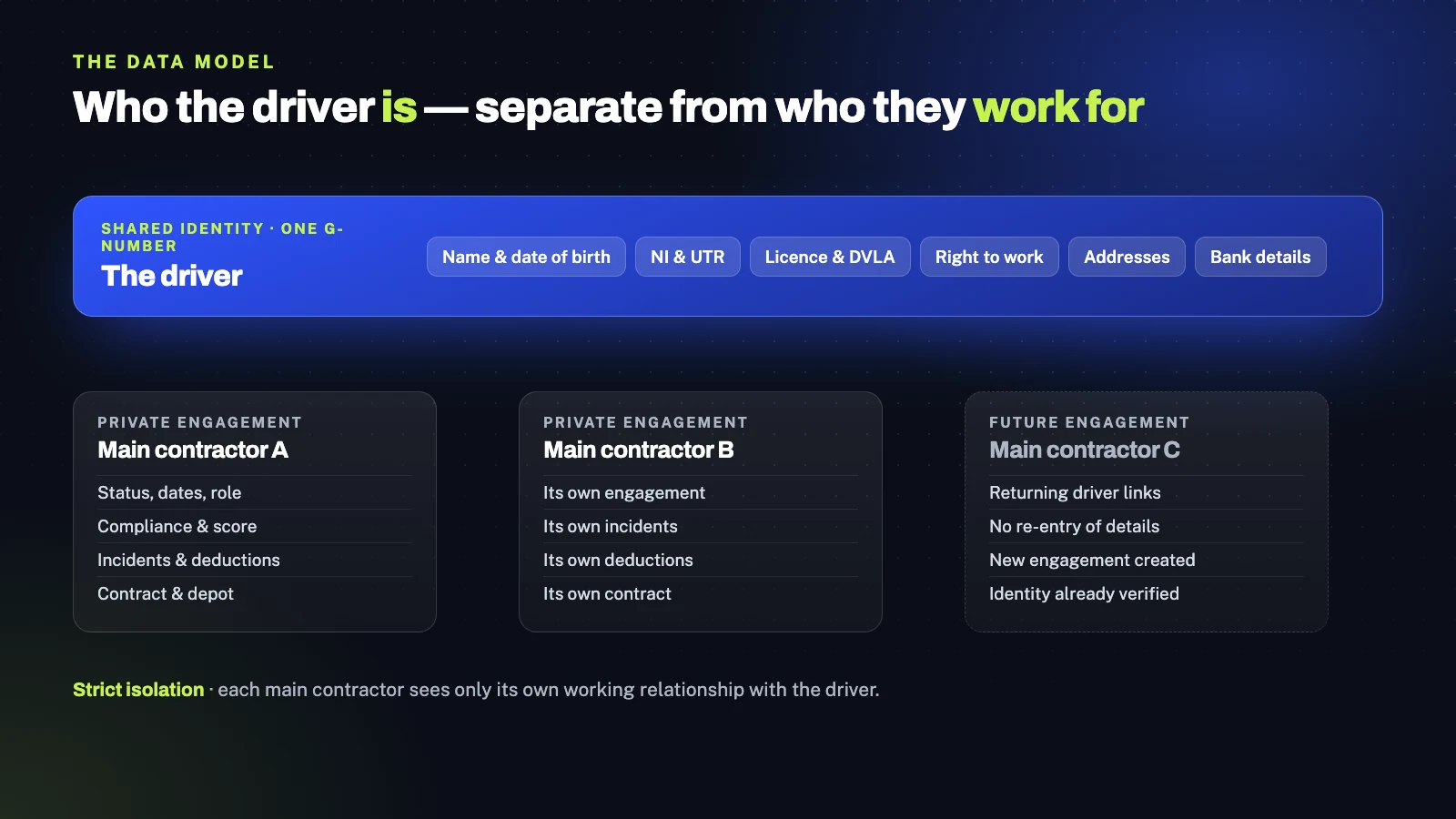
The data model carries the key architectural idea of the whole platform: separating who the driver IS from who they WORK FOR. Driver identity (name, date of birth, NI number, UTR, VAT numbers, addresses, licence and right-to-work evidence, photos, bank details) is held once, with one G-Number per real driver, shared across every main contractor they ever work for. Engagement is held separately: one record per driver per main contractor, carrying status, dates, role, compliance results, score and incident log, private to that main contractor. A site link ties the engagement to a specific depot and end client, and holds the contract.
This split is what makes the multi-tenancy work. A returning driver joining a new main contractor does not re-enter their details: their identity is already there, and a new engagement is created against it. Each main contractor sees only its own engagement with that driver, with its own incidents, deductions and contract. The driver is one person across the system; the contractors see only their own working relationship with them.
Around that core, every surface of the platform was built mobile-first for drivers, white-labelled per main contractor, and designed to save state as users move through it, so nothing gets lost, no screen requires completion in a single sitting, and every main contractor's drivers experience their main contractor's brand throughout.
Multi-tenant platforms live or die on the data model. Get the split between shared identity and private engagement right, and the rest of the platform almost designs itself. Get it wrong, and nothing else fixes it.
Subhash Panchani, CEO & Co-Founder, iTechCloud Solution
What we built
The Connect Workforce Platform, end to end.
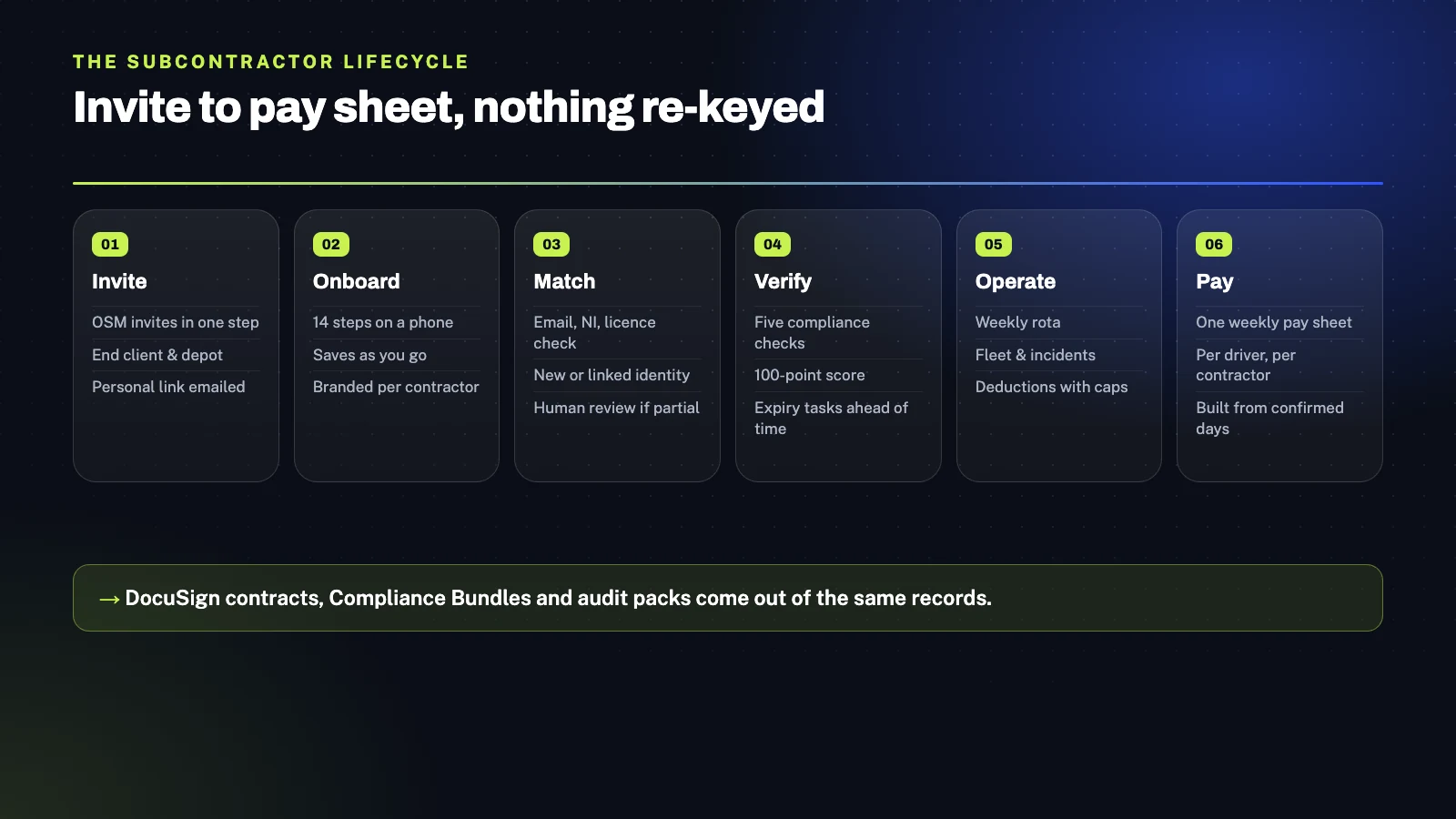
The platform is organized around six integrated capability areas, each covering a stage of the subcontractor lifecycle and connecting cleanly to the next.
Four portals on one Salesforce platform
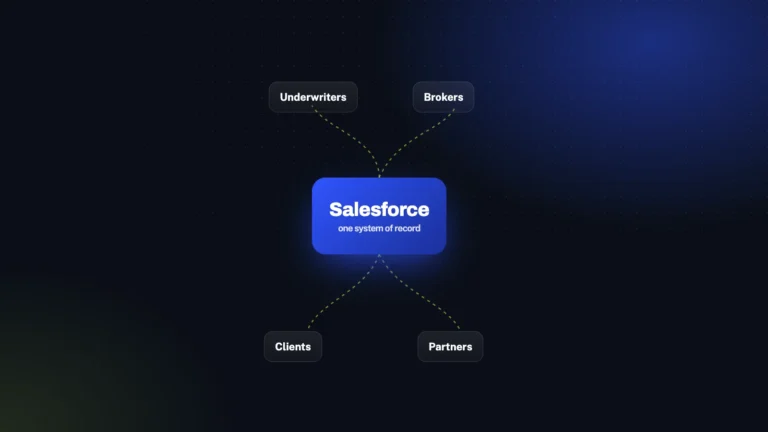
Connect's operations team work in a native Salesforce internal org, the Connect app, where they set up main contractors, depots and products, support drivers, resolve duplicates and process pay. Main contractors and their On Site Managers work through the Experience Cloud partner portal we built, the MC Site, with per-main-contractor branding applied across every screen a driver or OSM sees. Drivers interact only with a mobile-first onboarding site, opened from their personal invite link. Each party sees only what their role requires: shared identity data is accessible to all parties; engagement data stays strictly private to the main contractor it belongs to.
Main contractor setup with full white-label branding
Connect's team sets up each main contractor once, and every subsequent driver screen for that contractor is automatically branded. Per-main-contractor company information drives the white-label driver journey: navbar logo, hero image, primary and secondary colours, button colours, font size and welcome copy. Depots and end clients are configured per main contractor, so when an OSM invites a driver, selecting the end client filters the list of available depots. Each main contractor has its own product catalogue with display order, Most Popular and Add-On flags, and flat-rate VAT logic that determines which products a driver sees during onboarding. DocuSign templates are linked per end client, so the correct contract version is sent automatically based on the driver's depot and end client. The result is an onboarding experience that feels like each main contractor's own product, not a shared platform's.
14-step mobile driver onboarding with save-as-you-go
The OSM invites a driver in one step (name, phone, email, role, end client, depot, preferred language) and the platform creates an Application record and emails the driver a personal onboarding link. The driver opens the link on their phone, confirms their email, and completes a guided 14-step flow: confirming details, uploading a profile photo, capturing NI number and date of birth, driving licence details with front and back photos, right-to-work document and category, VAT and UTR status, current and previous address with postcode lookup, emergency contact, bank details, a Connect product video in their language, product and add-on selection, terms and conditions, DocuSign contract signing, and a welcome screen. Every step saves as the driver completes it, so they can stop and resume at any point. The whole flow is designed for completion on a phone, in the real-world conditions where delivery drivers actually onboard.
Smart duplicate control and shared driver identity
When a driver finishes onboarding, the platform checks email, NI number and driving licence number against existing driver records before creating anything. No match creates a new driver Account and G-Number, linked to the Application. A full match links the driver to their existing Account through a new Association, carries over their existing details, and avoids creating a duplicate. A partial match presents a "Welcome back" screen to the driver, raises a case to Connect's Customer Care team, and lets a human confirm whether the two records are actually the same person before any linking happens. This three-way match handles the real-world messiness of returning drivers (a slightly different email, a renewed licence, a number mistyped on first registration) while preserving the one-driver-one-identity rule the whole platform depends on.
Onboarding tracker, five-check compliance and 100-point scoring
A single Onboarding Tracker screen shows every driver currently in onboarding: date invited, site, and six task icons (toxicology, background check, driving licence, right to work, contract signed, onboarding complete) with status colours for grey (no data), yellow (awaiting verification), green (complete) and red (failed or expired). Validation workflows walk the OSM through driving licence verification, DVLA check validation (with non-UK licences routed to a manual check), right-to-work validation (with document category, share code and automatic 90-day follow-up before permission expires), and toxicology and background check sign-off. Every driver carries a 100-point compliance score, shown as a colour-coded gauge: red 10 to 39, yellow 40 to 79, green 80 and above. The score comprises five items at 20 points each (right to work, driving licence, background check, toxicology and engagement) with points scaled by expiry proximity. Compliance Bundle generates a ZIP of all evidence for a driver on demand, so audit packs for end clients can be assembled in a click rather than a morning.
Rota, fleet, incidents, deductions and the weekly pay sheet
Depot operations run through four tightly integrated workspaces inside the MC Site. The Rota is a weekly grid of drivers by day, with per-cell assignment of route, vehicle and equipment, and per-column Confirm Day and per-driver Confirm Week actions that lock the week for pay. Fleet Management is a weekly view of every van at each depot (owned, rental or Armada; available, off road or planned off road) with upcoming MOT, road tax and service dates, condition rating and 7-day utilisation. Incidents are typed (bus lane fine, parking fine, speeding fine, missing parcel claim, photo compliance, van damage, damage charges), evidenced, and recorded against the main contractor's engagement, so no other main contractor ever sees them. Deductions can be created directly or linked to an incident, with net amount, VAT where it applies, and total; recovery runs as a percentage of net pay with a minimum per pay run, so no driver is ever cleared out in one hit. Pause stops recovery until a chosen date, and Deduct all Outstanding clears the balance from a leaver's final payments. All of this feeds a single weekly pay sheet, one per driver per main contractor, built from verified driver details captured once at onboarding, days confirmed in the rota, and evidenced deductions recovered under clear rules. Nothing is re-keyed; nothing is reconciled by hand.
The outcome
The full subcontractor lifecycle on one platform.
Connect now runs the full subcontractor lifecycle, from invite to pay sheet, on one platform that main contractors, On Site Managers and drivers use directly.
Onboarding
What was previously a mixture of long forms, document photos by message and separate contract signing is now one branded mobile flow that completes contract signing through DocuSign inside the same journey. Drivers resume where they left off, main contractors see progress in real time, and the days of waiting for a driver to be ready are gone.
Returning drivers
Where the previous tool created a new account and G-Number every time a driver joined another delivery partner, the platform maintains one Account and one G-Number per real driver, linked to each main contractor they engage with. Returning drivers reuse their verified identity automatically rather than re-entering everything.
Compliance
Verification documents that previously lived in inboxes with expiries tracked by hand are now in one tracker, with a live compliance score per driver, automatic expiry tasks that surface before documents lapse, and one-click Compliance Bundles for end-client audits. The audit packs that used to take a morning are now a download.
Visibility
Where each party previously held part of the picture, main contractors can see their onboarding, engaged, disengaged and dormant drivers by site in real time. The questions they used to chase (how many drivers are onboarding today, how many are at full compliance, who is about to lapse) are now live on their dashboard.
Daily operations
Rota, vans, incidents and deductions that previously lived in separate tools now live in one portal, feeding one weekly pay sheet. Each piece of work recorded once ends up in the right place downstream, with no re-keying between systems and no reconciliation at pay time.
Privacy
The data model separates shared identity from private engagement by design, so a driver who works for several main contractors over their career appears once in the system but keeps every main contractor's engagement, incidents and contracts strictly isolated. What was previously a constant risk is now a structural property of the platform.
Design targets
The platform was built against four specific onboarding-requirement targets: a 90% reduction in duplicate driver accounts, 25% faster onboarding per driver, 50% fewer manual clean-up requests from main contractors, and 95% of returning drivers linking to new main contractors without support. The architectural choices (one identity per driver, three-field duplicate matching with Customer Care fallback, mobile-first save-as-you-go onboarding, and Associations for returning-driver linking) are the specific mechanisms through which each of those targets is delivered.
Platform & tooling
What's under the hood.
Salesforce platform
Salesforce internal org for the Connect operations team, Experience Cloud for the main contractor and OSM portal (MC Site), mobile-first Salesforce site for driver onboarding.
Data model
Driver identity shared across main contractors with one G-Number per real driver, Engagement (one per driver per main contractor, private), Site Link for depot and end-client association with contract, Application, Account.
User interface
Lightning Web Components across every screen: dashboard, task list, score chart, contractor lists, onboarding tracker, driver profile, rota, fleet, incident and deduction log.
Business logic
Apex for invites, save-as-you-go onboarding, duplicate matching, status colour logic, 100-point scoring, expiry checks, engage rules, pay sheet generation and deduction recovery with per-pay-run caps.
Documents
Formatted PDF generation for licence, DVLA and right-to-work evidence; one-click Compliance Bundle ZIPs for end-client audits.
Integrations
DocuSign for driver contract signing, templated per end client; postcode and address lookup for driver addresses; product video hosting with multi-language support.
Security & privacy
Partner logins for main contractors and OSMs via Experience Cloud, with strict data isolation so each main contractor sees only its own drivers' engagements, sites, incidents and deductions.
Design & delivery
Mobile-first design for driver journeys, white-label branding per main contractor, Agile delivery, automated release management (Dev, UAT, Production).
Working with iTechCloud
How the engagement actually ran.
A multi-tenant platform build of this scope (four parties, four portals, deep data-model work, and real-world mobile experience for self-employed drivers) rewards disciplined architecture up front and tight iteration through the build. The way we structured this engagement reflects that balance.
Engagement model
Full-lifecycle platform build delivered end to end, followed by ongoing managed services to evolve the platform as Connect grows its main contractor base and expands into new areas. The build ran in clearly scoped phases (discovery, data model and architecture design, portal and onboarding build, operations and pay workflows, QA, release, hypercare), each with explicit entry and exit criteria so Connect always had clarity on where the engagement was and what came next.
Team shape
The engagement was led by a solution architect with Salesforce platform, Experience Cloud and multi-tenant architecture experience, supported by developers across Lightning Web Components, Apex and integration work, a dedicated business analyst, and QA throughout. CEO and Co-Founder Subhash Panchani sponsored the engagement and stayed personally involved in the architectural and strategic decisions, the founder-engaged model we apply to every major client engagement.
Governance and collaboration
Regular steering reviews with Connect's leadership, daily stand-ups within the delivery team, and architecture reviews at each major design decision. The data model and multi-tenancy design were co-created with Connect's team through workshops at the start of the engagement, so the platform's behaviour on day one reflected the specific operational realities of UK last-mile delivery subcontracting.