

Create Dynamic Dashboard in Salesforce: Complete Guide

Introduction
In today’s data-driven business environment, organisations rely heavily on real-time insights to make informed decisions. Salesforce dashboards play a critical role in visualising key metrics, tracking performance, and identifying opportunities. However, traditional dashboards often lack flexibility because they display data from a fixed user’s perspective.
This is where dynamic dashboards in Salesforce come into play. Dynamic dashboards allow you to present personalised data views to different users without creating multiple dashboards. Instead of static reporting, dynamic dashboards adjust based on the logged-in user, making them a powerful tool for improving efficiency, visibility, and decision-making.
This complete guide will walk you through everything you need to know about creating, configuring, and optimising dynamic dashboards in Salesforce.
Table of Contents
What is a dynamic dashboard in Salesforce?
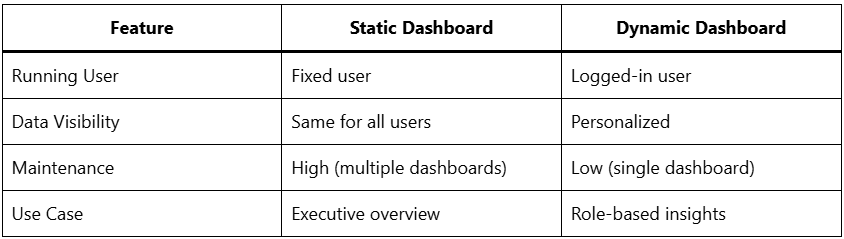
A dynamic dashboard is one that displays data tailored to the specific user viewing it. Unlike standard dashboards that run as a fixed user (usually the creator or a specified user), dynamic dashboards run as the logged-in user, meaning each viewer sees data based on their permissions and role hierarchy.
Key Concept:
- Static Dashboard → Shows same data to all users
- Dynamic Dashboard → Shows personalized data per user
For example:
- A sales manager can see team performance.
- A sales rep can see only their performance.
- Executives can view company-wide metrics.
All of these features are possible with a single dynamic dashboard.
Benefits of Dynamic Dashboards
1. Personalized Data Experience
Users only see data relevant to their role and access level, improving clarity and usability.
2. Reduced Dashboard Duplication
Instead of creating multiple dashboards for different users or teams, one dynamic dashboard can serve all.
3. Enhanced Security
Salesforce sharing rules and permissions automatically control data visibility.
4. Real-Time Insights
Users can instantly access metrics that matter to them without manual filtering.
5. Improved Productivity
Teams spend less time navigating reports and more time acting on insights.
Dynamic Dashboard vs Static Dashboard
When to Use Dynamic Dashboards
Dynamic dashboards are ideal in scenarios such as:
- Sales teams needing individual performance tracking
- Service agents monitoring their case workload
- Marketing teams tracking campaign performance by ownership
- Managers analyzing team performance with drill-down flexibility
Limitations of Dynamic Dashboards
Before creating one, it’s important to understand some limitations:
- Limited Number of Dynamic Dashboards
- Salesforce limits the number of users based on the edition.
- Enterprise: Up to 5
- Unlimited/Performance: Up to 10 (or more with add-ons)
- Salesforce limits the number of users based on the edition.
- No Scheduling
- You cannot schedule dashboard refresh emails.
- No Subscription
- Users cannot subscribe to dynamic dashboards.
- Performance Considerations
- Complex dashboards may load slower due to real-time data filtering.
Components of a Salesforce Dashboard
Before diving into dynamic dashboards, it is important to understand the core components.
1. Reports
Dashboards are built on reports. Each dashboard component pulls data from a report.
2. Dashboard Components
These include:
- Charts (Bar, Line, Pie)
- Tables
- Metrics
- Gauges
3. Filters
Allow users to refine dashboard data dynamically.
Step-by-Step Guide to Create a Dynamic Dashboard
Step 1: Create Source Reports
Start by building reports that will feed your dashboard.
Tips:
- Use appropriate report types
- Apply filters like “My Opportunities” or “My Team’s Data”
- Group data effectively for better visualisation.
Step 2: Create a New Dashboard
- Go to the Dashboards tab
- Click New Dashboard
- Enter:
- Name
- Description
- Click Create
Step 3: Add Dashboard Components
- Click + Component
- Select a report
- Choose a visualisation type:
- Bar chart for comparisons
- Pie chart for distribution
- Line chart for trends
- Customise:
- Titles
- Axis labels
- Display units
Repeat this step to add multiple components.
Step 4: Set Dashboard as Dynamic
This phase is the most important step.
- Click Edit Dashboard
- Locate View Dashboard. As
- Select:
- “The dashboard viewer”
This setting makes the dashboard dynamic.
Step 5: Save and Run
- Click Save
- Click Done
- View the dashboard as different users to test its behaviour.
Example Use Case
Sales Performance Dashboard
Components:
- Opportunities by Stage
- Revenue by Month
- Top Accounts
- Closed Deals
Dynamic Behaviour:
- Each sales rep sees only their deals
- Managers see team data
- Executives see full company performance
Best Practices for Dynamic Dashboards
1. Use “My” Filters in Reports
Always design reports with filters like the following:
- My Opportunities
- My Accounts
- My Team’s Cases
This approach ensures accurate personalisation.
2. Keep It Simple
Avoid cluttering dashboards with too many components. Focus on key metrics.
3. Optimize Performance
- Limit the number of components (5–7 recommended)
- Use summarized reports instead of detailed ones
4. Use Dashboard Filters
Add filters such as:
- Region
- Time period
- Product category
This enhances interactivity.
5. Test with Different Profiles
Ensure:
- Data visibility is correct
- No unauthorized access occurs
6. Use Meaningful Visualizations
Choose the right chart type:
- Pie → Distribution
- Bar → Comparison
- Line → Trends
Advanced Features
1. Dashboard Filters
You can add filters to allow users to refine data without modifying reports.
Example:
- Filter by region: North, South, East, West
2. Drill-Down Capabilities
Users can click on dashboard components to view underlying report data for deeper analysis.
3. Conditional Highlighting
Highlight key metrics:
- Red → Below target
- Green → Achieved target
4. Row-Level Security
Dynamic dashboards automatically respect:
- Role hierarchy
- Sharing rules
- Object permissions
Common Mistakes to Avoid
1. Not Using Proper Filters
Without “My” filters, dashboards won’t behave dynamically.
2. Overloading Dashboard
Too many components can confuse users and slow performance.
3. Ignoring User Permissions
Always verify access control before deployment.
4. Using Complex Reports
Heavy reports can impact dashboard loading speed.
5. Not Testing Across Roles
Ensure the dashboard works for:
- Admins
- Managers
- End users
Use Cases Across Departments
Sales
- Pipeline tracking
- Revenue forecasting
- Lead conversion rates
Customer Support
- Open cases
- SLA compliance
- Case resolution time
Marketing
- Campaign performance
- Lead generation metrics
- ROI tracking
Management
- KPI dashboards
- Business health metrics
- Cross-department insights
Dynamic Dashboard Limits and Workarounds
Challenge: Limited Dashboard Count
Solution:
- Combine multiple use cases into one dashboard using filters
- Use folder sharing for better access control
Challenge: No Scheduling
Solution:
- Use report subscriptions instead
- Export dashboard data manually if needed
Security Considerations
Dynamic dashboards are secure by design because they rely on Salesforce’s built-in security model:
- Role hierarchy
- Sharing rules
- Profile permissions
Always ensure:
- Sensitive data is restricted
- Proper access levels are configured
The Future of Dynamic Dashboards
With continuous improvements in Salesforce analytics, dynamic dashboards are becoming more powerful with:
- AI-driven insights
- Enhanced visualization tools
- Real-time data processing
- Integration with advanced analytics platforms
Conclusion
Dynamic dashboards in Salesforce are a game-changer for organisations looking to deliver personalised, real-time insights without creating multiple dashboards. By leveraging the power of user-based data visibility, businesses can enhance productivity, improve decision-making, and streamline reporting processes.
Whether you’re managing a sales team, running marketing campaigns, or overseeing customer support operations, dynamic dashboards provide the flexibility and scalability needed to adapt to diverse business needs.
By following best practices, understanding limitations, and optimising dashboard design, you can unlock the full potential of Salesforce dashboards and transform how your organisation uses data.