
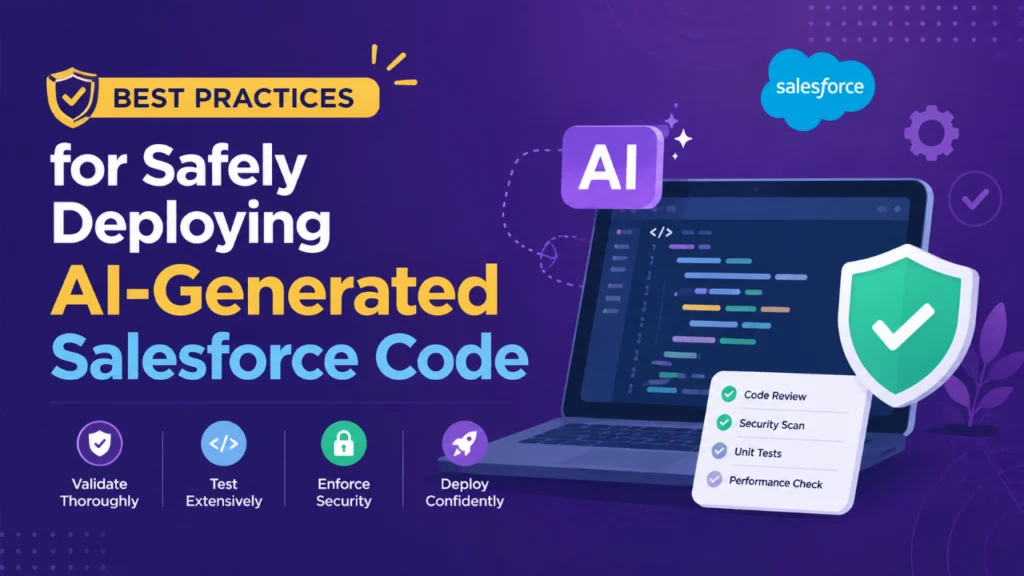
Introduction: Safely Deploying AI-Generated Salesforce Code
Artificial Intelligence is rapidly transforming Salesforce development. Modern AI-powered coding assistants can generate Apex classes, Lightning Web Components (LWC), Flows, validation rules, and automation scripts within seconds. While this technology significantly improves developer productivity, it also introduces new challenges related to code quality, security, compliance, and maintainability.
AI-generated code should never be treated as production-ready output. Instead, it should be viewed as a starting point that requires human validation, testing, and optimization. Organizations that combine AI efficiency with strong development governance can accelerate innovation while minimizing risks.
This article explores the best practices every Salesforce team should follow when safely deploying AI-generated code into production environments.
Table of Contents
Introduction: Safely Deploying AI-Generated Salesforce Code
Why AI-Generated Salesforce Code Requires Extra Attention
1. Treat AI-Generated Code as a Starting PointBest Practice
2. Conduct Thorough Code ReviewsCode Quality
Salesforce Best Practices
Business Logic Accuracy
3. Prioritize Security and ComplianceSecurity Checklist
4. Test Beyond the Minimum RequirementsUnit Testing
Integration Testing
Regression Testing
User Acceptance Testing
Edge Case Testing
5. Verify Bulkification and Governor LimitsRecommended Approach
6. Follow Established Development Standards
7. Use Version Control and CI/CD PipelinesRecommended Workflow
8. Maintain Clear Documentation
9. Monitor Production After DeploymentKey Monitoring Areas
10. Establish AI Governance Policies
The Role of Human Expertise
Conclusion
Why AI-Generated Salesforce Code Requires Extra Attention
AI tools are trained on large datasets and patterns, but they do not fully understand your organization’s business logic, compliance requirements, data model, or security policies.
Common risks include:
Incomplete business logic
Security vulnerabilities
Inefficient SOQL queries
Governor limit violations
Lack of proper error handling
Poor code maintainability
Insufficient test coverage
Without proper review, these issues can lead to production failures, performance degradation, and data security concerns.
1. Treat AI-Generated Code as a Starting Point
One of the biggest mistakes organizations make is to assume that AI-generated code is ready for deployment.
AI can:
Generate boilerplate code
Suggest implementation patterns
Create automation logic
Accelerate development tasks
However, developers must verify:
Business requirements alignment
Data model compatibility
Scalability considerations
Error-handling mechanisms
Security compliance
Every AI-generated component should undergo the same review process as manually written code.
Best Practice
Never deploy AI-generated code directly to production without human review and validation.
2. Conduct Thorough Code Reviews
Code reviews are critical for identifying issues that AI tools may overlook.
During reviews, Salesforce developers should evaluate:
Code Quality
Naming conventions
Readability
Reusability
Maintainability
Salesforce Best Practices
Bulkification
Trigger frameworks
Apex design patterns
Separation of concerns
Business Logic Accuracy
Correct calculations
Data processing rules
User permissions
Automation behavior
Peer reviews provide an additional layer of quality assurance before deployment.
3. Prioritize Security and Compliance
Security should always be a top priority when deploying AI-generated Salesforce code.
AI-generated code may inadvertently expose vulnerabilities such as:
SOQL Injection
SOSL Injection
Cross-site scripting risks
Unauthorized data access
Missing CRUD/FLS validation
Security Checklist
Ensure that generated code:
Enforces object-level permissions
Checks field-level security
Uses secure coding practices
Protects sensitive data
Avoids hardcoded credentials
Organizations operating in regulated industries must also verify compliance with internal governance and industry standards.
4. Test Beyond the Minimum Requirements
Salesforce requires test coverage before deployment, but coverage alone does not guarantee quality.
AI-generated code should undergo comprehensive testing, including:
Unit Testing
Validate individual methods and classes.
Integration Testing
Verify interactions between:
Apex
Flows
APIs
External systems
Regression Testing
Ensure existing functionality remains unaffected.
User Acceptance Testing
Confirm business users can successfully execute real-world scenarios.
Edge Case Testing
Test:
Null values
Large datasets
Permission restrictions
Invalid inputs
Comprehensive testing reduces the likelihood of unexpected production issues.
5. Verify Bulkification and Governor Limits
Salesforce operates within strict governor limits.
AI-generated code may function correctly with a few records but fail when processing large volumes of data.
Review code for:
SOQL queries inside loops
DML statements inside loops
Excessive CPU consumption
Unnecessary database operations
Recommended Approach
Always test generated code with bulk data scenarios to ensure scalability and platform compliance.
6. Follow Established Development Standards
Consistency is essential for long-term platform health.
Organisations should enforce coding standards that cover:
Apex naming conventions
Trigger architecture
Documentation requirements
Error handling
Logging standards
AI-generated code should be refactored where necessary to align with these standards.
Benefits include:
Easier maintenance
Faster troubleshooting
Improved collaboration
Reduced technical debt
7. Use Version Control and CI/CD Pipelines
AI-generated code should follow the same deployment lifecycle as any other Salesforce development project.
Recommended Workflow
Generate code using AI.
Review and refine the output.
Commit changes to source control.
Run automated testing.
Perform peer review.
Deploy through CI/CD pipelines.
Monitor production performance.
Version control provides:
Change tracking
Auditability
Rollback capability
Team collaboration
A structured deployment process significantly reduces risk.
8. Maintain Clear Documentation
Documentation becomes even more important when AI contributes to development.
Document:
Business requirements
Design decisions
Code functionality
Assumptions made
Deployment steps
Proper documentation helps future developers understand and maintain the solution.
It also improves onboarding and knowledge sharing across teams.
9. Monitor Production After Deployment
Deployment is not the end of the process.
Organizations should continuously monitor:
System performance
Error logs
User feedback
API usage
Governor limit consumption
Early monitoring helps identify issues before they impact users or business operations.
Key Monitoring Areas
Apex exceptions
Flow failures
Integration errors
Performance bottlenecks
Security alerts
Continuous monitoring ensures ongoing platform stability.
10. Establish AI Governance Policies
As AI adoption grows, organizations need clear governance frameworks.
An AI governance strategy should define:
Approved AI tools
Security requirements
Review processes
Deployment approvals
Documentation standards
Compliance requirements
Governance ensures AI is used responsibly and consistently across development teams.
Organizations with strong governance frameworks can maximize AI benefits while maintaining control and accountability.
The Role of Human Expertise
Despite the growing capabilities of AI, human expertise remains irreplaceable.
Salesforce developers, architects, and administrators provide:
Business context
Strategic decision-making
Security oversight
Architectural guidance
Quality assurance
The most successful Salesforce teams use AI as a productivity accelerator rather than a replacement for human judgment.
AI can generate code, but experienced professionals ensure that code delivers real business value safely and effectively.
Conclusion
AI-generated Salesforce code offers tremendous opportunities to improve development speed and efficiency. However, speed should never come at the expense of quality, security, or reliability. Organizations that safely deploy AI-generated code follow a disciplined approach that includes thorough code reviews, comprehensive testing, security validation, performance optimization, proper documentation, and strong governance practices.
By treating AI as a collaborative development partner rather than an autonomous developer, Salesforce teams can confidently accelerate innovation while maintaining the high standards required for enterprise applications. Salesforce development will combine artificial intelligence and human expertise in the future. Teams that successfully balance both will be best positioned to build secure, scalable, and high-performing Salesforce solutions in the AI-driven era.
Founder and CEO of iTechCloud Solution, a Salesforce consulting and product partner since 2017. He sets engagement strategy and stays the commercial owner of every account, working with clients across Salesforce, AI and data from the first call through to go-live.
Connect on LinkedIn