Revenue Growth Using Salesforce Sales Cloud Playbook

Revenue Growth Using Salesforce Sales Cloud Playbook

Revenue Growth Using Salesforce Sales Cloud Playbook

Introduction

In today’s competitive business environment, achieving consistent revenue growth requires more than just a strong sales team. Organizations must adopt structured processes, intelligent tools, and data-driven strategies to improve performance and scalability. Salesforce Sales Cloud, combined with a well-defined playbook, provides businesses with a powerful framework to streamline sales operations, enhance productivity, and drive sustainable revenue growth.

This case study examines how a mid-sized enterprise successfully leveraged the Salesforce Sales Cloud Playbook to transform its sales processes, improve pipeline visibility, and significantly increase revenue. By implementing standardized workflows, automation, and analytics, the organization was able to overcome operational challenges and establish a high-performing sales culture.

Company Background

The organization featured in this case study is a mid-sized B2B services company operating in multiple regional markets. With a growing customer base and expanding product portfolio, the company had ambitious revenue targets but faced limitations in its existing sales infrastructure.

Before adopting Salesforce Sales Cloud, the company relied on spreadsheets, disconnected CRM systems, and manual reporting processes. These tools lacked real-time visibility and made it difficult for leadership to monitor performance, forecast revenue, and coach sales representatives effectively.

The management team recognized the need for a modern, scalable platform that could unify sales activities and provide actionable insights. After evaluating several options, Salesforce Sales Cloud was selected as the core system for driving sales excellence.

Challenges Faced Before Implementation

Despite having skilled sales professionals, the company experienced several operational and strategic challenges that hindered growth.

1. Lack of Standardized Sales Processes

Each sales representative followed their own approach to prospecting, qualification, and closing. This inconsistency led to unpredictable results and made it difficult to replicate success across teams.

2. Limited Pipeline Visibility

Managers struggled to obtain accurate pipeline data. Forecasts were often based on assumptions rather than real-time metrics, leading to missed targets and inefficient resource allocation.

3. Manual and Time-Consuming Tasks

Sales representatives spent a significant portion of their time on administrative tasks such as data entry, follow-ups, and reporting. This reduced their available time for customer engagement.

4. Poor Data Quality

Customer information was scattered across multiple systems, resulting in duplicate records, outdated data, and incomplete profiles. This affected personalization and relationship management.

5. Ineffective Coaching and Performance Tracking

Without detailed analytics, managers found it difficult to identify skill gaps, provide targeted coaching, or recognize high performers.

These challenges collectively limited the organization’s ability to scale revenue operations effectively.

Implementation of the Salesforce Sales Cloud Playbook

To address these issues, the company developed and deployed a comprehensive Salesforce Sales Cloud Playbook. The playbook served as a structured guide outlining best practices, workflows, and performance standards for the entire sales organization.

1. Defining the Sales Methodology

The first step was to establish a standardized sales methodology aligned with the company’s business goals. This methodology defined each stage of the sales cycle, including:

Each stage was mapped to Salesforce opportunity stages, ensuring consistency across teams.

2. Configuring Sales Cloud Features

The company customized Salesforce Sales Cloud to support its defined methodology. Key configurations included:

These configurations ensured that the system reflected real-world sales processes.

3. Creating Playbook Templates and Guides

Sales playbooks were embedded directly within Salesforce using custom objects, knowledge articles, and in-app guidance. These resources included:

Reps could access these materials directly from their dashboards, improving adoption and consistency.

4. Automation and Workflow Optimization

Automation was implemented to eliminate repetitive tasks and reduce manual effort. Examples included:

This allowed sales teams to focus more on relationship building and deal closing.

5. Training and Change Management

A structured training program was launched to ensure successful adoption. This included:

Leadership emphasized the importance of Salesforce as a strategic tool rather than just a reporting platform.

Leveraging Data and Analytics

One of the most significant advantages of the Salesforce Sales Cloud Playbook was its advanced analytics capabilities.

1. Real-Time Dashboards

Custom dashboards provided real-time insights into key performance indicators such as:

These dashboards enabled managers to make data-driven decisions quickly.

2. Predictive Forecasting

Using historical data and trend analysis, the company improved its revenue forecasting accuracy. This helped leadership allocate resources more effectively and plan growth initiatives.

3. Performance Benchmarking

Sales representatives could compare their performance against team averages and top performers. This encouraged healthy competition and continuous improvement.

4. Customer Insights

Centralized customer data provided a 360-degree view of each account, including interaction history, preferences, and buying patterns. This enabled more personalized sales approaches.

Impact on Sales Productivity

The implementation of the Sales Cloud Playbook resulted in substantial productivity improvements.

Reduced Administrative Work

Automation reduced manual tasks by nearly 40 percent, allowing reps to spend more time selling.

Faster Lead Response

Automated routing and notifications improved lead response times, increasing conversion rates.

Improved Collaboration

Integrated communication tools and shared dashboards enhanced collaboration between sales, marketing, and customer success teams.

Consistent Sales Execution

Standardized playbooks ensured that every representative followed best practices, resulting in more predictable outcomes.

Revenue Growth Outcomes

Within 18 months of implementation, the company experienced measurable revenue growth and operational improvements.

1. Increased Win Rates

The standardized qualification process and better deal management improved win rates by approximately 25 percent.

2. Higher Average Deal Value

Better customer insights and structured upselling strategies increased average deal size.

3. Shorter Sales Cycles

Automated workflows and clear stage definitions reduced sales cycle duration by nearly 20 percent.

4. Improved Customer Retention

Enhanced post-sale engagement and renewal management improved customer retention rates.

5. Overall Revenue Growth

The combined effect of these improvements resulted in a revenue increase of over 30 percent within two years.

Cultural and Organizational Transformation

Beyond financial results, the Salesforce Sales Cloud Playbook helped transform the company’s sales culture.

Data-Driven Mindset

Decisions were increasingly based on real-time insights rather than intuition.

Accountability and Transparency

Clear performance metrics fostered accountability at all levels.

Continuous Learning

Embedded learning resources encouraged ongoing skill development.

Employee Engagement

Sales representatives reported higher job satisfaction due to reduced administrative burden and clearer expectations.

Key Lessons Learned

Several important lessons emerged from this implementation.

1. Executive Sponsorship Is Critical

Strong leadership support was essential for driving adoption and overcoming resistance to change.

2. Customization Should Balance Simplicity

While customization added value, excessive complexity was avoided to ensure usability.

3. Training Must Be Ongoing

Continuous training and reinforcement were necessary to maintain high adoption levels.

4. Data Quality Matters

Early investment in data cleansing and governance improved long-term results.

5. Iterative Improvement Delivers Results

The playbook was regularly updated based on user feedback and performance data.

Conclusion

This case study demonstrates how a structured Salesforce Sales Cloud Playbook can serve as a powerful catalyst for revenue growth. By standardizing processes, automating routine tasks, and leveraging advanced analytics, the organization transformed its sales operations and achieved sustainable performance improvements.

The successful implementation of Salesforce Sales Cloud was not merely a technology upgrade but a strategic initiative that aligned people, processes, and data around common goals. Through consistent execution, continuous learning, and strong leadership, the company built a scalable sales engine capable of adapting to changing market conditions.

Organizations seeking to drive predictable revenue growth can learn valuable lessons from this case study. A well-designed Salesforce Sales Cloud Playbook, supported by training, analytics, and cultural alignment, can significantly enhance sales effectiveness and long-term business success.

Service Cloud Automation That Cut Resolution Time by 40%

Service Cloud Automation That Cut Resolution Time by 40%

Service Cloud Automation That Cut Resolution Time by 40%

Introduction

In today’s highly competitive digital environment, customer expectations are higher than ever. Customers demand fast responses, personalized support, and consistent service quality across all channels. For service-oriented organizations, meeting these expectations while managing increasing case volumes is a major challenge.

This case study explores how a mid-sized technology services company successfully implemented Salesforce Service Cloud automation to streamline its customer support operations. By adopting intelligent workflows, AI-powered routing, and self-service tools, the company reduced its average case resolution time by 40%, improved agent productivity, and significantly enhanced customer satisfaction.

The transformation demonstrates how strategic automation can turn a reactive support model into a proactive, data-driven service operation.

Company Background

The organization featured in this case study is a B2B SaaS provider offering cloud-based business management solutions to small and medium enterprises. With a customer base of over 50,000 users across multiple regions, the company handled thousands of service requests every month.

The customer support team consisted of:

Support was offered through email, phone, live chat, and a basic customer portal.

Despite having a dedicated team, the company struggled to maintain consistent service quality due to growing customer demand and outdated manual processes.

Challenges Before Automation

Before implementing Service Cloud automation, the company faced several operational bottlenecks.

1. High Case Resolution Time

Cases were assigned manually based on availability rather than expertise. Agents often received cases outside their skill area, leading to:

The average resolution time exceeded 52 hours, affecting customer confidence.

2. Inefficient Case Routing

Incoming requests were routed to a shared queue. Team leaders manually reviewed and distributed cases, which consumed valuable time and caused backlogs during peak hours.

3. Limited Visibility and Reporting

Managers lacked real-time insights into:

Reports were generated manually at the end of each week, making it difficult to identify issues proactively.

4. Repetitive Manual Tasks

Agents spent nearly 30% of their time on non-value-added activities such as:

This reduced the time available for complex problem-solving.

5. Inconsistent Customer Experience

Response quality varied depending on the agent handling the case. There were no standardized templates, workflows, or escalation paths, leading to inconsistent service delivery.

Objectives of the Automation Initiative

To overcome these challenges, the leadership team initiated a Service Cloud automation project with the following goals:

  1. Reduce average resolution time by at least 30%
  2. Improve first-contact resolution rate
  3. Optimize agent workload distribution
  4. Enhance SLA compliance
  5. Deliver a consistent omnichannel experience
  6. Increase overall customer satisfaction

A cross-functional task force was created, including service managers, Salesforce administrators, business analysts, and frontline agents.

Automation Strategy and Implementation

The company adopted a phased implementation approach to minimize operational disruption and ensure smooth adoption.

Phase 1: Process Mapping and Redesign

Before automation, the team conducted a detailed review of existing workflows.

Key activities included:

This analysis helped eliminate unnecessary steps and define optimized processes.

Phase 2: Intelligent Case Routing

Using Salesforce Omni-Channel and rule-based automation, the company implemented intelligent routing.

Key features included:

Cases were now distributed in real time, ensuring the right agent handled the right request.

Phase 3: Automated Case Management Workflows

The company implemented Salesforce Flow and workflow rules to automate routine tasks.

Automated processes included:

These workflows reduced manual intervention and improved consistency.

Phase 4: AI-Powered Case Classification

Einstein AI was configured to analyze incoming requests and suggest:

Based on historical data, the system learned common patterns and improved classification accuracy over time.

This significantly reduced misrouting and rework.

Phase 5: Knowledge Base and Self-Service Portal

A comprehensive knowledge base was developed using Service Cloud Knowledge.

Features included:

The customer portal was redesigned to promote self-service.

Customers could now:

Within six months, nearly 28% of incoming issues were resolved through self-service.

Phase 6: Agent Productivity Tools

Several tools were introduced to support agents.

These included:

Agents could resolve common issues with a few clicks, improving efficiency.

Phase 7: Real-Time Analytics and Dashboards

Custom dashboards were built to monitor performance.

Key metrics tracked included:

Managers received real-time alerts when thresholds were breached.

This enabled proactive intervention.

Change Management and Training

Technology alone could not guarantee success. The company invested heavily in change management.

Training Programs

Agents underwent structured training on:

Training combined classroom sessions, simulations, and on-the-job coaching.

Adoption Champions

Senior agents were appointed as “automation champions” to guide peers and collect feedback.

Continuous Feedback Loop

Weekly feedback sessions helped identify improvement areas and fine-tune automation rules.

Results and Performance Improvements

After nine months of implementation, the company recorded significant improvements.

1. Resolution Time Reduction

This represented a 40% reduction in average resolution time.

2. Improved First-Contact Resolution

First-contact resolution increased from 61% to 78%, reducing repeat interactions.

3. Higher Agent Productivity

Agents focused more on complex and high-value cases.

4. Better SLA Compliance

SLA adherence improved from 82% to 96%, strengthening customer trust.

5. Customer Satisfaction Growth

Customer satisfaction scores increased from 3.8 to 4.6 out of 5.

Positive feedback highlighted faster responses and clearer communication.

6. Cost Efficiency

The company avoided hiring 12 additional agents by improving efficiency, resulting in substantial operational savings.

Business Impact

Beyond operational metrics, automation delivered strategic value.

Enhanced Brand Reputation

Faster and consistent support strengthened the company’s market positioning.

Scalable Support Model

The automated framework enabled the company to support 35% higher case volumes without compromising quality.

Data-Driven Decision Making

Management used analytics to optimize staffing, training, and service policies.

Employee Satisfaction

Agent turnover decreased by 18% due to reduced stress and improved work processes.

Lessons Learned

Several key lessons emerged from this transformation.

1. Process First, Technology Second

Automation was successful because processes were optimized before digitization.

2. Start Small and Scale

Phased implementation reduced risk and encouraged user acceptance.

3. Involve Frontline Teams

Agent feedback ensured practical and user-friendly automation.

4. Invest in Knowledge Management

A strong knowledge base was critical to improving resolution speed.

5. Monitor and Optimize Continuously

Regular performance reviews helped refine automation rules.

The Future Roadmap

Building on its success, the company plans further enhancements.

Future initiatives include:

These innovations aim to further improve customer engagement and operational excellence.

Conclusion

This case study demonstrates how strategic Service Cloud automation can transform customer support operations. By integrating intelligent routing, AI-powered classification, workflow automation, self-service tools, and real-time analytics, the company achieved a 40% reduction in resolution time while enhancing service quality.

The initiative not only improved efficiency but also strengthened customer relationships, empowered employees, and created a scalable support model. As customer expectations continue to rise, organizations that embrace automation-driven service excellence will gain a sustainable competitive advantage.

Salesforce Flow Automation That Saved 500+ Work Hours

Salesforce Flow Automation That Saved 500+ Work Hours

Salesforce Flow Automation That Saved 500+ Work Hours

In the modern enterprise, “time is money” is no longer just a cliché—it is an operational mandate. For Global Logistics Pro (GLP), a mid-sized supply chain firm, the cost of manual labor wasn’t just found in salaries; it was found in the “invisible leaks” of their CRM.

By the time GLP reached 200 employees, their Salesforce instance had become a digital filing cabinet rather than an engine of growth. Administrative “debt” the time spent on manual data entry, clicking through screens, and fixing human errors had reached a breaking point. This case study explores how GLP utilized Salesforce Flow to automate three core business pillars, ultimately saving over 500 work hours every month.

The Crisis of Manual Velocity

Before the automation initiative, GLP’s operations were governed by “The Spreadsheet Shuffle.” Despite having a robust Salesforce license, employees were performing tasks that felt more like clerical work than strategic management.

The Three Primary Bottlenecks:

  1. Manual Lead Triage: Every morning, the Sales Operations Manager spent 2.5 hours manually reviewing inbound leads, checking territories, and assigning them to the correct Account Executive (AE).
  2. The “Copy-Paste” Proposal Cycle: Sales reps were spending roughly 60 minutes per deal drafting proposals. They would copy data from Salesforce fields into Word documents, calculate discounts on a handheld calculator, and then re-upload the finished PDF.
  3. Fragmented Post-Sales Onboarding: Once a deal was “Closed-Won,” the Operations team had to manually create 12 different related records (Tasks, Milestones, and Billing Schedules) to start the project. This process took nearly 90 minutes per client.

With roughly 150 new leads a day and 80 closed deals a month, GLP was losing over 6,000 hours a year to tasks that required zero critical thinking.

The Architecture of the Solution

The IT team decided against purchasing expensive third-party “point solutions.” Instead, they leaned into the native power of Lightning Flow Builder. They designed a three-phase automation roadmap aimed at the “Highest Effort/Lowest Value” tasks.

Phase 1: The Intelligent Lead Engine (Record-Triggered Flow)

The first priority was eliminating the morning triage. The team built a Record-Triggered Flow that fires the moment a Lead is created.

Phase 2: The Guided Sales Wizard (Screen Flow)

To tackle the proposal bottleneck, GLP replaced the manual Word document process with a Screen Flow. This “Wizard” walked the sales rep through a series of inputs.

Phase 3: The “Closed-Won” Explosion (Sub-Flows)

The most significant time-saver was the “Onboarding Explosion.” When an Opportunity stage changes to “Closed-Won,” an Autolaunched Flow triggers a chain reaction.

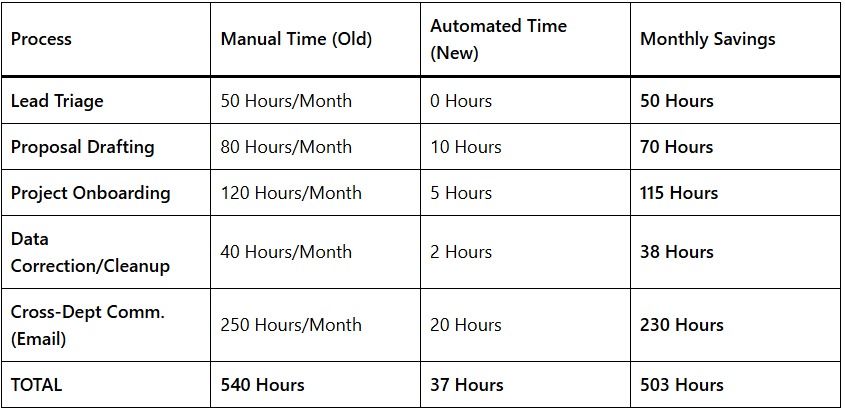
Quantifying the ROI: The 500-Hour Breakdown

The impact of these flows was measured over a 90-day pilot period. The data revealed a staggering reduction in “Dead Time.”

Salesforce Flow Automation That Saved 500 Work Hours

The “Snowball” Effect

Beyond the 500 hours saved, the company saw a 22% increase in Lead-to-Quote speed. Because the automation handled the “busy work,” Sales reps were able to get proposals into the hands of prospects while the interest was still fresh.

Lessons Learned in Flow Governance

Building automation is powerful, but GLP learned that “with great power comes great responsibility.” To maintain these flows, they implemented three key rules:

  1. One Flow Per Object: To avoid “race conditions” where multiple automations fight over the same record, they consolidated their logic into a single Record-Triggered Flow per object (Lead, Account, Opportunity).
  2. Error Handling (Fault Paths): Every Flow was built with a “Fault Path.” If an automation fails (e.g., a required field is missing), the Flow doesn’t just crash; it sends an automated email to the Admin with the exact record ID and error message.
  3. User-Centric Design: They involved the Sales Reps in the design of the Screen Flows. This ensured the “Wizard” felt like a helpful tool rather than a restrictive form.

Conclusion: Salesforce Flow Automation

By delegating 500+ hours of repetitive tasks to Salesforce Flow, Global Logistics Pro didn’t just save money they unlocked their team’s potential. The Sales Operations Manager, once buried in lead triage, now spends her time analyzing conversion data to optimize the sales funnel. The Customer Success team, once reactive, is now proactive, starting client projects the same day a deal closes.

This case study proves that the true value of Salesforce isn’t just in storing data, but in moving it. Automation is no longer a luxury for the tech giants; it is a survival requirement for any business that wants to scale without losing its soul to paperwork.

Streamlining Insurance Operations: Integration and Transformation

Streamlining Insurance Operations: Integration and Transformation

Streamlining Insurance Operations: Integration and Transformation

Introduction: Insurance Operations

In the dynamic landscape of the Insurance Operations industry, staying competitive demands seamless integration of systems and efficient processes. This case study delves into the partnership between a leading insurance company based in the USA, renowned for its global insurance protection offerings across 160 countries, and iTechCloud Solution, a trusted integration provider. The client sought to consolidate its disparate systems into Salesforce, aiming to enhance operational efficiency and establish a unified platform for data management.

Client Background:

The client, a leading insurance provider, boasted an extensive portfolio of Insurance Operations products spanning various sectors and industries worldwide. With a commitment to delivering exceptional service and comprehensive coverage, the client recognized the need to modernize its operations and leverage technology to meet evolving customer expectations.

Challenge:

The client faced a complex challenge stemming from its diverse product offerings, each with unique quote creation processes and intricacies in calculations. Although the quote, binder, and invoice documents remained consistent across products, the underlying calculations differed significantly. The task at hand for iTechCloud Solution was to devise a solution that would automate the quote-to-invoice process while accommodating the diverse requirements of each product. Additionally, the solution needed to offer customized views of data and facilitate data downloads in various formats to meet the client’s specific needs.

Solution:

iTechCloud Solution embarked on a comprehensive approach to address the client’s challenges and deliver a robust solution aligned with their digital transformation objectives.

The key components of the arrangement included:

1. Integration of Multiple Solutions:

iTechCloud Solution seamlessly integrated the client’s disparate systems into Salesforce, establishing it as the single source of truth for data management. By consolidating data from various sources, the integration paved the way for enhanced visibility, efficiency, and collaboration across the organization.

2. Implementation of Salesforce Clouds:

The team implemented Salesforce Sales, Service, and Industry (Vlocity) clouds to cater to the client’s diverse needs and streamline operations across sales, customer service, and industry-specific functionalities. This comprehensive suite of cloud solutions empowered the client to optimize processes and deliver personalized experiences to customers.

3. Customization for Product Variability:

Recognizing the variability in product requirements, iTechCloud Solution developed a flexible and scalable solution that could adapt to the unique quote creation processes and calculations of each product. Through customization and configuration, the team ensured that the solution met the specific needs of each product while maintaining consistency and accuracy.

4. Automation of Processes:

The capabilities of Salesforce automation tools, iTechCloud Solution automated the quote-to-invoice process, reducing manual efforts and minimizing errors. By streamlining workflows and automating repetitive tasks, the solution enabled the client to improve operational efficiency and accelerate time-to-market for Insurance Operations products.

5. Customized Data Views and Formats:

The client’s need for customized data views and formats, iTechCloud Solution implemented tailored solutions within Salesforce. This included the development of custom reports and dashboards, enabling stakeholders to access real-time insights and make data-driven decisions. Additionally, the team implemented features for data export in various formats, ensuring compatibility with the client’s internal systems and reporting requirements.

Results:

The collaborative efforts between the client and iTechCloud Solution yielded significant results, driving transformation and efficiency across insurance operations:

1. Enhanced Efficiency:

The streamlined quote-to-invoice process resulted in improved operational efficiency, reducing manual efforts and accelerating cycle times.

2. Improved Accuracy:

By automating calculations and standardizing processes, the solution minimized errors and discrepancies, ensuring accuracy in Insurance Operations documentation and transactions.

3. Enhanced Visibility:

The implementation of Salesforce clouds provided the client with enhanced visibility into sales, service, and industry-specific metrics, empowering stakeholders to make informed decisions.

4. Increased Customer Satisfaction:

The ability to deliver personalized experiences and expedited services enhanced customer satisfaction and loyalty, strengthening the client’s competitive position in the market.

Summary:

The collaboration between the leading insurance company and iTechCloud Solution exemplifies the power of technology-driven transformation in the insurance industry. By leveraging Salesforce integration and customization capabilities, the client successfully streamlined its operations, optimized processes, and enhanced customer experiences. This case study serves as a testament to the value of strategic partnerships and innovative solutions in driving digital transformation and sustainable growth in the Insurance Operations sector.

Revolutionizing Safety Solutions: A Salesforce Implementation

Revolutionizing Safety Solutions: A Salesforce Implementation

Revolutionizing Safety Solutions: A Salesforce Implementation

Introduction: Safety Solutions

In today’s industrial landscape, ensuring the safety of people and critical assets is paramount. For a global industrial manufacturer and supplier based in Kansas City, this meant providing innovative safety solutions to mitigate dangers such as fire, explosion, and over-pressurization. This case study explores how the company partnered with iTechCloud Solution to implement Sales, Experience (Community), and Field Service Lightning clouds, revolutionizing their operations and customer engagement.

Background:

With a legacy of excellence spanning decades, the company has been at the forefront of developing cutting-edge safety solutions for industries worldwide. Their commitment to innovation and quality has made them a trusted partner for organizations seeking to protect their personnel and assets from potential hazards. Based in Kansas City, the company operates on a global scale, serving diverse industries such as manufacturing, oil and gas, and petrochemicals.

Challenge:

Despite their expertise and global reach, the company faced challenges in effectively managing sales processes, engaging with customers, and delivering timely field services. Disparate systems and manual processes hindered collaboration between sales, service, and support teams, leading to inefficiencies and delays. Additionally, the company lacked a centralized platform for customer interaction, making it difficult to provide seamless support and personalized experiences.

Solution:

To address these challenges, the company partnered with iTechCloud Solution, a leading provider of cloud-based CRM solutions. Leveraging Salesforce Sales, Experience (Community), and Field Service Lightning clouds, the company embarked on a transformative journey to enhance sales effectiveness, improve customer engagement, and optimize field service operations.

1. Sales Cloud Implementation:
2. Experience (Community) Cloud Implementation:
3. Field Service Lightning Implementation:
Implementation Process:

The implementation process involved several key steps:

Results:

The implementation of Salesforce solutions yielded significant results for the company:

Summary:

The partnership between the global industrial manufacturer and iTechCloud Solution exemplifies the power of innovative technology in driving business transformation. By implementing Salesforce Sales, Experience, and Field Service Lightning clouds, the company successfully addressed their challenges, improved operational efficiency, and enhanced customer engagement. Moving forward, the company remains committed to leveraging Salesforce’s capabilities to further innovate and deliver exceptional safety solutions to industries worldwide.

Contact Us
Loading
Your message has been sent. Thank you!
© Copyright iTechCloud Solution 2024. All Rights Reserved.