

Salesforce Flow Automation That Saved 500+ Work Hours

In the modern enterprise, “time is money” is no longer just a cliché—it is an operational mandate. For Global Logistics Pro (GLP), a mid-sized supply chain firm, the cost of manual labor wasn’t just found in salaries; it was found in the “invisible leaks” of their CRM.
By the time GLP reached 200 employees, their Salesforce instance had become a digital filing cabinet rather than an engine of growth. Administrative “debt” the time spent on manual data entry, clicking through screens, and fixing human errors had reached a breaking point. This case study explores how GLP utilized Salesforce Flow to automate three core business pillars, ultimately saving over 500 work hours every month.
Table of Contents
The Crisis of Manual Velocity
Before the automation initiative, GLP’s operations were governed by “The Spreadsheet Shuffle.” Despite having a robust Salesforce license, employees were performing tasks that felt more like clerical work than strategic management.
The Three Primary Bottlenecks:
- Manual Lead Triage: Every morning, the Sales Operations Manager spent 2.5 hours manually reviewing inbound leads, checking territories, and assigning them to the correct Account Executive (AE).
- The “Copy-Paste” Proposal Cycle: Sales reps were spending roughly 60 minutes per deal drafting proposals. They would copy data from Salesforce fields into Word documents, calculate discounts on a handheld calculator, and then re-upload the finished PDF.
- Fragmented Post-Sales Onboarding: Once a deal was “Closed-Won,” the Operations team had to manually create 12 different related records (Tasks, Milestones, and Billing Schedules) to start the project. This process took nearly 90 minutes per client.
With roughly 150 new leads a day and 80 closed deals a month, GLP was losing over 6,000 hours a year to tasks that required zero critical thinking.
The Architecture of the Solution
The IT team decided against purchasing expensive third-party “point solutions.” Instead, they leaned into the native power of Lightning Flow Builder. They designed a three-phase automation roadmap aimed at the “Highest Effort/Lowest Value” tasks.
Phase 1: The Intelligent Lead Engine (Record-Triggered Flow)
The first priority was eliminating the morning triage. The team built a Record-Triggered Flow that fires the moment a Lead is created.
- Logic: The Flow utilizes a “Decision” element to evaluate the Lead’s Industry, Annual Revenue, and Geographic Location.
- Weighted Assignment: Using a custom metadata table, the Flow checks the current “load” of each Sales Rep. If Rep A has 50 active leads and Rep B has only 30, the Flow automatically routes the new lead to Rep B to maintain balance.
- Immediate Gratification: The Flow also triggers an automated, personalized “Introduction Email” from the assigned rep, ensuring the lead is touched within seconds of inquiry.
Phase 2: The Guided Sales Wizard (Screen Flow)
To tackle the proposal bottleneck, GLP replaced the manual Word document process with a Screen Flow. This “Wizard” walked the sales rep through a series of inputs.
- Dynamic Data Fetching: The Flow pulls existing Opportunity data, so the rep never types a name or address twice.
- Complex Logic: For pricing, the Flow uses a Formula Resource to calculate tiered discounts based on volume.
- Calculation Example: If $Quantity > 1000$, apply a 15% discount; otherwise, apply 5%.
- One-Click Generation: Upon finishing the wizard, the Flow calls an Apex action (or a document generation tool) to merge the data into a branded template and email it for signature via an integration.
Phase 3: The “Closed-Won” Explosion (Sub-Flows)
The most significant time-saver was the “Onboarding Explosion.” When an Opportunity stage changes to “Closed-Won,” an Autolaunched Flow triggers a chain reaction.
- Record Creation: In under two seconds, the Flow creates a Project record, five core Milestones, and a series of Onboarding Tasks for the Success Team.
- Slack Orchestration: The Flow sends a formatted notification to the company’s Slack “Wins” channel, tagging the relevant team members so they can begin work immediately without checking Salesforce.
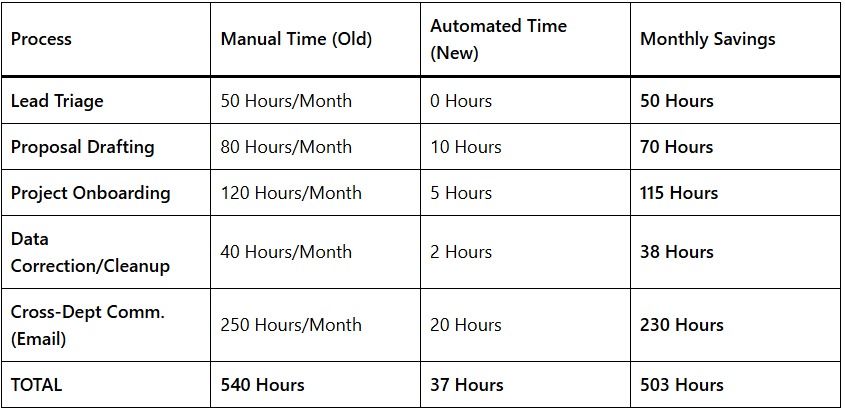
Quantifying the ROI: The 500-Hour Breakdown
The impact of these flows was measured over a 90-day pilot period. The data revealed a staggering reduction in “Dead Time.”
The “Snowball” Effect
Beyond the 500 hours saved, the company saw a 22% increase in Lead-to-Quote speed. Because the automation handled the “busy work,” Sales reps were able to get proposals into the hands of prospects while the interest was still fresh.
Lessons Learned in Flow Governance
Building automation is powerful, but GLP learned that “with great power comes great responsibility.” To maintain these flows, they implemented three key rules:
- One Flow Per Object: To avoid “race conditions” where multiple automations fight over the same record, they consolidated their logic into a single Record-Triggered Flow per object (Lead, Account, Opportunity).
- Error Handling (Fault Paths): Every Flow was built with a “Fault Path.” If an automation fails (e.g., a required field is missing), the Flow doesn’t just crash; it sends an automated email to the Admin with the exact record ID and error message.
- User-Centric Design: They involved the Sales Reps in the design of the Screen Flows. This ensured the “Wizard” felt like a helpful tool rather than a restrictive form.
Conclusion: Salesforce Flow Automation
By delegating 500+ hours of repetitive tasks to Salesforce Flow, Global Logistics Pro didn’t just save money they unlocked their team’s potential. The Sales Operations Manager, once buried in lead triage, now spends her time analyzing conversion data to optimize the sales funnel. The Customer Success team, once reactive, is now proactive, starting client projects the same day a deal closes.
This case study proves that the true value of Salesforce isn’t just in storing data, but in moving it. Automation is no longer a luxury for the tech giants; it is a survival requirement for any business that wants to scale without losing its soul to paperwork.