

Top 35+ Salesforce Integration Interview Questions and Answers 2026
Introduction: Salesforce Integration Interview Questions and Answers 2026
Salesforce integration has evolved significantly by 2026, driven by API-first architectures, real-time data expectations, event-driven systems, MuleSoft, Data Cloud, and Agentic AI. Modern Salesforce professionals are expected to understand not just how to integrate, but why, when, and at what scale.
This advanced guide covers the most important Salesforce integration interview questions and answers, focusing on architecture, performance, security, real-time processing, error handling, and enterprise patterns.
Table of Contents
1. What is Salesforce Integration, and why is it critical in enterprise ecosystems?
Salesforce integration is the process of connecting Salesforce with external systems such as ERPs, payment gateways, marketing platforms, data warehouses, and custom applications to ensure seamless data flow and business process automation.
In enterprise ecosystems, integration is critical because:
- Salesforce rarely operates in isolation
- Enterprises require real-time or near-real-time data synchronization
- Business processes span multiple systems
- Compliance, scalability, and reliability depend on robust integration architecture
2. What are the main types of Salesforce integrations?
Salesforce integrations are broadly categorized into:
- Data Integration – Synchronizing data between systems
- Process Integration – Orchestrating business workflows across platforms
- User Interface Integration – Embedding Salesforce UI with external apps
- Security Integration – Centralized authentication and authorization
- Analytics Integration – Feeding Salesforce data into BI or AI platforms
3. Explain inbound vs outbound integration in Salesforce.
- Inbound Integration: External systems call Salesforce APIs to create, update, or fetch data.
- Outbound Integration: Salesforce initiates communication to external systems using callouts, events, or middleware.
Enterprise architectures often use bidirectional integration managed via middleware to avoid tight coupling.
4. What integration approaches are commonly used in Salesforce?
Common approaches include:
- Point-to-Point Integration
- Middleware-Based Integration
- Event-Driven Integration
- API-Led Connectivity
- Batch-Based Integration
In 2026, middleware and event-driven architectures are preferred for scalability and maintainability.
5. Why is middleware important in Salesforce integrations?
Middleware (such as MuleSoft) acts as an intermediary layer that:
- Decouples Salesforce from external systems
- Handles transformations, validations, and routing
- Provides centralized error handling and retries
- Improves scalability and monitoring
- Enforces security and governance
Middleware is essential for enterprise-grade integrations.
6. What APIs does Salesforce provide for integration?
Salesforce offers multiple APIs, including:
- REST API
- SOAP API
- Bulk API 2.0
- Composite API
- Streaming API
- Tooling API
- Metadata API
- Pub/Sub API (for event-driven use cases)
Choosing the right API depends on data volume, latency, and transaction complexity.
7. When should REST API be used instead of SOAP API?
REST API is preferred when:
- Lightweight, stateless communication is required
- Mobile or web clients are involved
- JSON payloads are preferred
- Performance and simplicity matter
SOAP API is still relevant for:
- Legacy enterprise systems
- Strict contract-based integrations
- Complex transactional operations
8. What is Bulk API 2.0, and when should it be used?
Bulk API 2.0 is optimized for:
- Large data volumes
- Asynchronous processing
- Data migration and ETL operations
It minimizes API calls, handles batching internally, and is ideal for millions of records.
9. Explain Salesforce Composite API and its benefits.
Composite API allows multiple API calls in a single request. Benefits include:
- Reduced network latency
- Fewer API calls
- Transactional control
- Dependency chaining between requests
It is ideal for mobile and high-performance applications.
10. What is an event-driven integration in Salesforce?
Event-driven integration uses events instead of direct API calls to communicate changes. Salesforce supports:
- Platform Events
- Change Data Capture (CDC)
- Pub/Sub API
This approach enables real-time, loosely coupled, and scalable integrations.
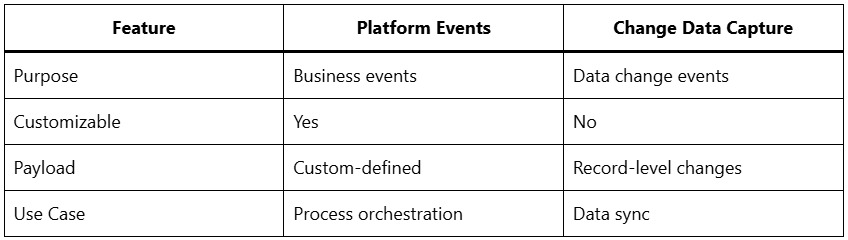
11. Difference between Platform Events and Change Data Capture?
12. How does Salesforce handle real-time integrations?
Real-time integrations are achieved using:
- Platform Events
- CDC
- Streaming API
- Pub/Sub API
- Synchronous REST callouts (with caution)
Event-based models are preferred over synchronous callouts for reliability.
13. What are Salesforce callout limits, and how do you manage them?
Key limits include:
- 100 synchronous callouts per transaction
- 120-second timeout
- Payload size restrictions
Best practices:
- Use asynchronous Apex
- Offload logic to middleware
- Use event-driven patterns
- Implement retry mechanisms outside Salesforce
14. What is Named Credential, and why is it important?
Named Credentials simplify authentication by:
- Storing endpoint URLs
- Managing OAuth tokens securely
- Eliminating hardcoded credentials
- Supporting token refresh automatically
They are a best practice for all secure integrations.
15. How is OAuth used in Salesforce integrations?
OAuth is used for:
- Secure API access
- Token-based authentication
- Delegated authorization
Salesforce supports:
- OAuth 2.0 Authorization Code Flow
- JWT Bearer Flow
- Client Credentials Flow (via middleware)
16. How do you secure Salesforce integrations?
Security is enforced using:
- OAuth scopes
- IP whitelisting
- Shield encryption
- API user profiles with least privilege
- Named Credentials
- Certificate-based authentication
Security must be designed at both Salesforce and middleware layers.
17. What is External Services in Salesforce?
External Services allow Salesforce to:
- Consume REST APIs declaratively
- Generate Apex and Flow actions automatically
- Integrate without writing complex Apex code
They are ideal for low-code integration scenarios.
18. What is Salesforce Connect?
Salesforce Connect enables:
- Real-time access to external data
- No data storage in Salesforce
- OData-based integration
It is useful when data residency or storage cost is a concern.
19. How does Salesforce Data Cloud impact integrations in 2026?
Salesforce Data Cloud acts as:
- A centralized data unification layer
- A real-time ingestion and activation engine
- An integration hub for AI-driven insights
It reduces point-to-point integrations and enables composable data architectures.
20. What are common integration error-handling strategies?
Advanced error handling includes:
- Dead-letter queues
- Retry with exponential backoff
- Idempotency keys
- Centralized logging
- Alerting and monitoring dashboards
Never rely solely on Apex exception handling for enterprise integrations.
21. What is idempotency, and why is it important?
Idempotency ensures that:
- Duplicate requests do not create duplicate records
- Integration retries are safe
- Data consistency is maintained
This is critical for asynchronous and event-based systems.
22. How do you handle data consistency across systems?
Strategies include:
- Master data management (MDM)
- Source-of-truth definition
- Event-driven synchronization
- Reconciliation jobs
- Versioning and timestamps
Consistency must be designed, not assumed.
23. What is the role of Apex in integrations?
Apex is used for:
- Making callouts
- Consuming APIs
- Publishing events
- Handling callbacks
- Custom transformations
However, heavy processing should be delegated to middleware.
24. How do you test Salesforce integrations?
Testing strategies include:
- Mock callouts using HttpCalloutMock
- Sandbox-to-sandbox testing
- Contract testing
- End-to-end integration testing
- Load and performance testing
Testing is critical to avoid runtime failures in production.
25. What is the difference between synchronous and asynchronous integration?
- Synchronous: Immediate response, user waits
- Asynchronous: Background processing, event-driven
Asynchronous integrations scale better and are preferred in modern architectures.
26. How does MuleSoft fit into Salesforce integration strategy?
MuleSoft provides:
- API-led connectivity
- Reusable APIs
- Centralized governance
- Monitoring and analytics
- Secure and scalable orchestration
It is Salesforce’s strategic integration platform.
27. What is API-led connectivity?
API-led connectivity organizes integrations into:
- System APIs
- Process APIs
- Experience APIs
This approach improves reuse, scalability, and agility.
28. How do you monitor Salesforce integrations?
Monitoring includes:
- Event logs
- Middleware dashboards
- API usage metrics
- Error alerts
- Performance analytics
Proactive monitoring prevents business disruptions.
29. How do governor limits impact integrations?
Governor limits restrict:
- API calls
- CPU time
- Heap size
- Callouts
Designing integrations without considering limits leads to failures at scale.
30. What are integration patterns commonly used in Salesforce?
Common patterns include:
- Request–Response
- Fire-and-Forget
- Batch Data Synchronization
- Event Notification
- Saga Pattern (for long-running processes)
Choosing the right pattern is an architectural decision.
31. How do you handle large payloads in Salesforce integrations?
Best practices:
- Use Bulk API
- Compress payloads
- Chunk data
- Stream data instead of loading fully
- Use external storage when required
32. What is Pub/Sub API, and why is it important?
Pub/Sub API enables:
- High-throughput event streaming
- Bi-directional communication
- Scalable real-time integrations
It is designed for modern cloud-native architectures.
33. How do you design integrations for high availability?
High availability is achieved through:
- Asynchronous processing
- Retry mechanisms
- Stateless services
- Middleware failover
- Graceful degradation
34. What are common integration anti-patterns?
Avoid:
- Hardcoding credentials
- Point-to-point integrations at scale
- Synchronous callouts in triggers
- Ignoring error handling
- Overloading Apex with heavy logic
35. How will AI and Agentic systems affect Salesforce integrations?
By 2026:
- AI agents trigger integrations autonomously
- Real-time data feeds power decision engines
- Integrations become context-aware
- Event-driven systems replace batch-heavy designs
Integration architects must design for AI-first workflows.
36. What skills are expected from a Salesforce Integration Architect in 2026?
Key skills include:
- API design
- Event-driven architecture
- Middleware expertise
- Security and compliance
- Performance optimization
- Data governance
- AI-aware integration strategies
Conclusion
Salesforce integration in 2026 is no longer about simple API calls—it is about architecting resilient, scalable, secure, and intelligent systems. Interviewers increasingly test real-world scenarios, architectural thinking, and problem-solving depth rather than surface-level knowledge. Mastering these advanced Salesforce integration concepts positions you as a future-ready Salesforce professional capable of handling enterprise-scale digital ecosystems.