

SLDS 2: The Key to a Future-Ready Salesforce UI
As Salesforce continues to evolve into a more intelligent, intuitive, and AI-driven platform, the way users interact with its interface also needs to advance. The launch of Salesforce Lightning Design System 2 (SLDS 2) marks a major milestone in delivering a UI framework designed for the modern digital enterprise. With its enhanced design principles, expanded components, improved accessibility, and deep alignment with Salesforce’s Einstein ecosystem, SLDS 2 sets a new benchmark for building scalable, future-ready Salesforce applications.
For businesses and developers, especially implementation partners like iTechCloud Solution, SLDS 2 unlocks the ability to create immersive, consistent, and efficient user experiences—far beyond what was possible with the original Lightning Design System.
In this blog, we break down everything you need to know about SLDS 2 and why it is becoming the foundation of the next-generation Salesforce UI.
Table of Contents
What Is SLDS 2? A Quick Overview
Salesforce Lightning Design System 2 is the next iteration of Salesforce’s UI design framework that provides standardized patterns, tokens, components, and guidelines for building interfaces aligned with the Lightning Experience.
SLDS 2 introduces:
- A refreshed visual language
- More flexible and modular components
- Enhanced accessibility and compliance
- Theming capabilities using design tokens
- Optimized performance and lighter component structures
- Support for AI-first UI patterns
- Integration readiness with modern front-end frameworks
In short, SLDS 2 is not just another UI update—it is a strategic upgrade built for the future of low-code development, AI-driven workflows, and scalable enterprise applications.
Why SLDS 2 Matters Today
The Salesforce ecosystem is undergoing a major transformation with the rise of Einstein Copilot, Agentforce, Data Cloud, and custom AI-powered applications. As organizations automate more of their workflows, the need for clear, consistent, and efficient UIs has never been higher.
SLDS 2 ensures that:
✔ Salesforce apps look modern and unified
Whether it’s a custom LWC, Experience Cloud site, or internal app, SLDS 2 enables consistent branding and experience across all environments.
✔ Developers and designers work faster
Modular components reduce the effort needed to build, test, and maintain UI layers.
✔ Apps are more accessible
SLDS 2 is fully aligned with WCAG and ADA guidelines, ensuring inclusivity.
✔ Performance improves
Better component architecture reduces DOM complexity and improves load times.
✔ The UI is fully AI-ready
SLDS 2 supports patterns for conversational UI, generative UX, automation panels, and guided workflows.
For Salesforce partners like iTechCloud Solution, these capabilities translate into faster implementation, higher user adoption, and longer-term scalability for clients.
Core Enhancements Introduced in SLDS 2
1. New and Improved Design Tokens
Design tokens form the foundation of SLDS 2. The latest update includes:
- Unified tokens for spacing, colors, typography, and layout
- Theming tokens for brand customization
- Context-aware tokens for dark mode, high-contrast mode, and accessibility
This token-based approach makes it easier to maintain design consistency and adapt the UI to changing brand guidelines without rewriting code.
2. Updated Components for Modern UX
SLDS 2 introduces new, modern components and enhancements such as:
- Flexible grids and responsive containers
- Revamped buttons, forms, and navigation elements
- Improved data tables with better pagination and sorting
- AI prompts, suggestion UIs, and Copilot interaction elements
These components are optimized for mobile responsiveness, accessibility, and performance—ensuring Salesforce apps remain competitive with today’s design standards.
3. Seamless Alignment With Lightning Experience
SLDS 2 is built to mirror the latest Salesforce Lightning Experience UX, ensuring:
- Pixel-perfect consistency
- Reduced UI discrepancies
- Lower maintenance overhead
- Greater user trust and familiarity
Developers can now create custom Lightning Web Components that look and behave like native Salesforce components leading to a more cohesive app experience.
4. Performance and Code Efficiency
SLDS 2 introduces structural improvements, such as:
- Lighter DOM trees
- Reduced CSS footprint
- Component-focused wrappers
- Faster rendering cycles
These enhancements significantly improve the performance of LWCs, Aura components, and custom apps making Salesforce UIs smoother and more responsive even at scale.
5. Deep Accessibility Focus
SLDS 2 is built around inclusivity, offering:
- WCAG 2.2 compliance
- Screen reader improvements
- Keyboard navigability
- Better color contrast
- Updated ARIA standards
This ensures that Salesforce apps can be used by everyone, including users with visual, hearing, cognitive, or mobility challenges.
6. AI-First Visual System
One of the most forward-thinking elements of SLDS 2 is its AI-centric design philosophy. With patterns for:
- Conversational interfaces
- AI assistants
- Predictive suggestions
- Automated task cards
- Copilot panels
SLDS 2 becomes the ideal UI foundation for the future of AI-driven business workflows.
How SLDS 2 Elevates Developer Productivity
For Salesforce developers, SLDS 2 reduces complexity and speeds up development cycles through:
📌 Standardized building blocks
Developers can rely on ready-to-use, well-tested UI components.
📌 Faster debugging and updates
Centralized tokens simplify global UI changes.
📌 Better compatibility with frameworks
SLDS 2 is more flexible for integration with React, Angular, and web standards.
📌 Improved documentation and usability
The updated design system includes clearer examples, guidance, and patterns.
📌 Future-proof UI development
As Salesforce continues to enhance its AI and automation capabilities, SLDS 2 ensures your UI remains aligned with the platform’s direction.
SLDS 2 vs. SLDS 1: What Has Really Changed?
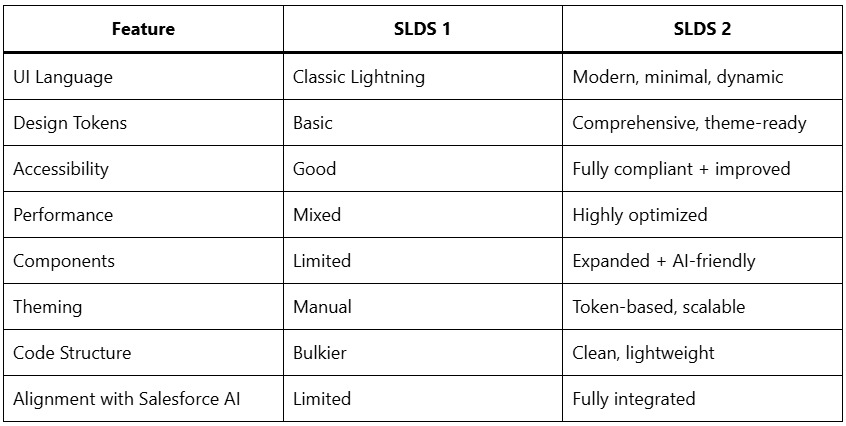
SLDS 2 clearly represents a major uplift not just an incremental update.
Why SLDS 2 Is Critical for Future Salesforce Implementations
As Salesforce pivots toward a unified, AI-centered experience, SLDS 2 becomes the backbone for all future customizations. Organizations adopting it early will benefit from:
- Higher user adoption
- More visually appealing and intuitive apps
- Faster performance across all devices
- Better compatibility with new Salesforce releases
- Reduced cost of maintenance
- Improved accessibility compliance
For partners like iTechCloud Solution, SLDS 2 enables delivering transformation-ready digital experiences that match the pace of enterprise modernization.
How iTechCloud Solution Leverages SLDS 2 for Clients
At iTechCloud Solution, our UI/UX and Salesforce development teams use SLDS 2 to:
- Build high-performance Lightning Web Components
- Customize Experience Cloud sites with modern branding
- Design enterprise-grade dashboards and workflows
- Ensure accessibility compliance for every application
- Deliver AI-ready UI frameworks for Agentforce, Copilot, and Data Cloud
- Implement scalable design systems for large teams
Our goal is to help clients build beautiful, functional, and future-ready Salesforce experiences that drive adoption and efficiency.
Conclusion: SLDS 2 Is the Future of Salesforce UI
SLDS 2 is more than a design upgrade it is the foundation for the next generation of Salesforce experiences. With its focus on modularity, performance, accessibility, and AI-driven design patterns, it empowers businesses to build applications that not only look modern but also scale with the evolving Salesforce ecosystem.
As the platform continues to innovate with AI, automation, and unified data, SLDS 2 ensures that your UI stays consistent, future-proof, and aligned with the Lightning Experience. For organizations aiming to elevate their Salesforce applications, adopting SLDS 2 is no longer optional—it’s essential.