

How to Integrate Salesforce with an External System
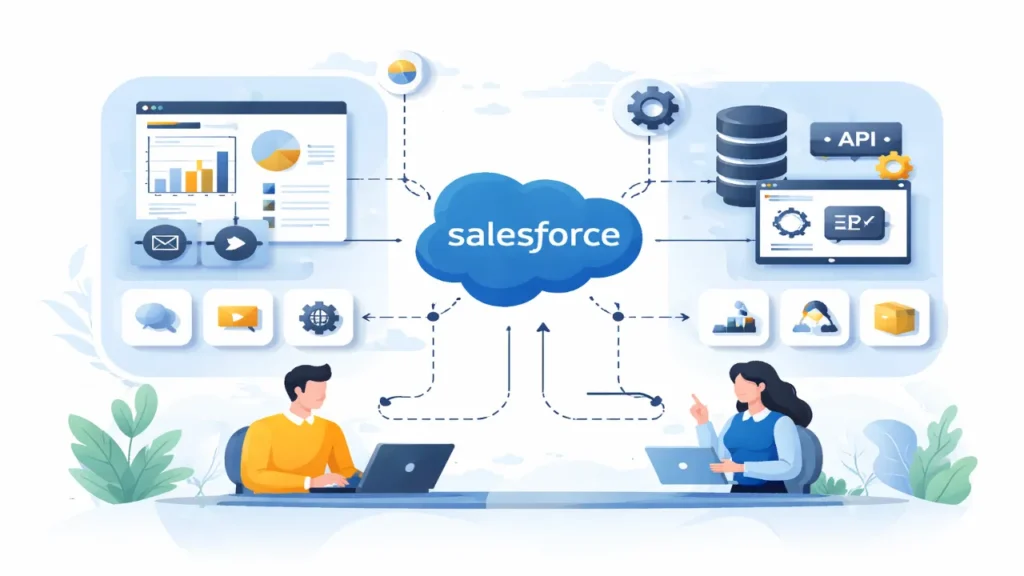
Salesforce offers powerful tools to connect with external systems such as ERPs, databases, and third-party apps, enabling seamless data flow across silos. This guide provides step-by-step solutions using declarative and programmatic methods for real-world integrations.
Table of Contents
Why Integrate Salesforce?
Integrating Salesforce breaks data barriers and automates workflows, such as syncing customer orders from an e-commerce platform to opportunities. It supports real-time updates, batch processing, and UI embedding for unified experiences.
Businesses gain efficiency by avoiding manual entry, reducing errors, and scaling operations—essential for CRM success in dynamic environments.
Key Integration Patterns
- Remote Process Invocation: Salesforce triggers external actions synchronously or asynchronously.
- Batch Synchronization: Scheduled data syncs for large volumes, like nightly financial reconciliations.
- Remote Call-In: External systems push data to Salesforce, e.g., orders from e-commerce.
- UI Update: Real-time external data changes are reflected in Salesforce interfaces.
- Event-Driven: Platform events notify systems instantly of record changes.
Choose patterns based on volume, latency needs, and directionality for optimal performance.
Method 1: Salesforce Connect for External Objects
Salesforce Connect accesses live external data via external objects, avoiding duplication and storage costs. It uses adapters like OData, custom Apex, or AWS DynamoDB for real-time read/write.
Setup Steps
- Go to Setup > Integrations > External Data Sources > New External Data Source.
- Select adapter (e.g., OData 4.0), enter URL, and enable writable if needed.
- Configure authentication (per-user or named principal).
- Save, then Validate and Sync to map external tables to objects.
External objects behave like standard ones query via SOQL, searchable, and joinable (up to 4 joins).
Limitations: $4,000/month per connection; 20,000 OData calls/hour; no aggregates in some SOQL.
Example: Connect to ERP inventory view stock levels in Salesforce reports without import.
Method 2: External Services and HTTP Callouts (No-Code)
Use Flow Builder’s HTTP Callout or External Services for API integrations without Apex. Auto-generates invocable actions from OpenAPI specs or direct calls.
HTTP Callout Steps
- In Flow Builder, add an HTTP Callout action (Winter ’24 GA).
- Enter endpoint URL, method (GET/POST), headers; provide sample response JSON.
- Flow auto-creates an Apex wrapper to use output variables downstream.
External Services Steps:
- Setup > Named Credentials > New for auth (OAuth/JWT).
- Setup > External Services > Register > Upload OpenAPI schema.
- Use generated actions in Flows or Apex.
Example Flow: GET weather API on lead creation, store forecast in a custom field.
This declarative approach suits admins, handling CRUD via REST without middleware.
Method 3: REST/SOAP APIs (Programmatic)
For custom needs, use Salesforce REST API for CRUD on objects. Authenticate via Connected App and OAuth.
Set up Connected App
- Setup > App Manager > New Connected App.
- Enable OAuth, set callback URL, and scopes (e.g., api, refresh_token).
- Note Client ID/Secret.
OAuth Flow (Password Grant for server-to-server):
POST /services/oauth2/token
grant_type=password&client_id=ID&client_secret=SECRET&username=USER&password=PASS
Extract access_token and instance_url.
Query Example (curl):
curl https://instance.salesforce.com/services/data/v60.0/query/?q=SELECT+Id,Name+FROM+Account -H "Authorization: Bearer TOKEN"Batch requests to respect limits (100 callouts/transaction).
C# .NET Snippet:
HttpResponseMessage message = client.PostAsync(loginEndpoint, content).Result;HttpContent content = new FormUrlEncodedContent(new Dictionary<string, string>
{
{"grant_type", "password"},
{"client_id", ClientId},
{"client_secret", ClientSecret},
{"username", Username},
{"password", Password}
});
HttpResponseMessage message = client.PostAsync(loginEndpoint, content).Result;Secure with HTTPS, IP restrictions, and token refresh.
Method 4: MuleSoft for Complex Integrations
MuleSoft (Salesforce-owned) excels in API-led connectivity, real-time sync via Anypoint Platform. Use connectors for Salesforce objects and external DBs/APIs.
Basic Flow
- Create a Mule app in Anypoint Studio.
- Drag Salesforce “Create/Upsert” connector; configure OAuth.
- Add an HTTP Listener or a Database trigger.
- Deploy to CloudHub; test via Postman.
Event-Driven Example: Subscribe to AccountCreated platform event, insert into external DB.
Benefits: Reusable APIs, scalability, and monitoring are ideal for hybrid/multi-system setups.
Advanced Tools: Platform Events and Outbound Messages
- Platform Events: Pub/sub for real-time; publish on record change, subscribe externally.
- Outbound Messages: SOAP notifications on workflows, simple, no-code outbound.
Combine with Change Data Capture for delta syncs.
Best Practices and Security
- Error Handling: Implement retries, logging, and monitoring via Event Log Files.
- Security: OAuth 2.0, HTTPS, least-privilege profiles; avoid hardcoded creds.
- Governor Limits: Batch data, async Apex/Flows; use Bulk API for >10k records.
- Testing: Mock callouts for deployments; validate in sandboxes.
- Scalability: Incremental syncs, partitioning for high-volume.
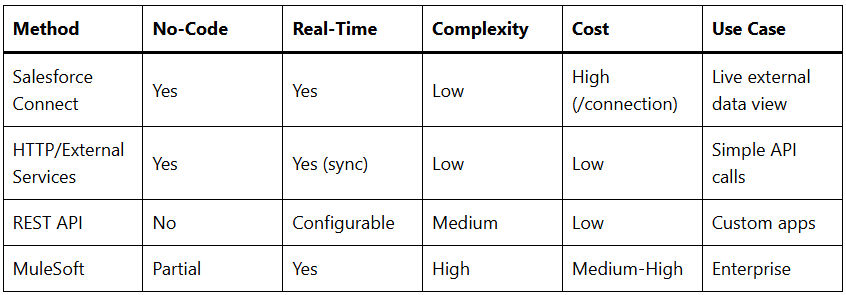
Comparison Table:
Implementation Example: Sync Orders from External ERP
- Use Salesforce Connect (OData) to expose ERP orders as external objects.
- Flow on Opportunity close: HTTP POST to ERP via External Service.
- Platform Event on ERP webhook: Inbound REST creates Order record.
- Batch nightly sync via Data Loader or ETL for history.
Monitor via Setup > Integrations > API Usage; scale with middleware if limits are hit.
This solution empowers your Salesforce org for hybrid ecosystems, boosting agility. Start with no-code options for quick wins, scale to APIs/MuleSoft as needed.