

How to deploy custom settings in Salesforce

Introduction: How to deploy custom settings in Salesforce
Salesforce Custom Settings play a critical role in building scalable, flexible, and configurable applications on the Salesforce platform. Whether you are managing environment-specific values, feature flags, or configuration data, Custom Settings allow developers and admins to avoid hardcoding values directly into Apex or flows.
However, one of the most common challenges teams face is Salesforce custom settings deployment between sandboxes and production environments. Improper deployment can lead to broken functionality, missing configuration values, or unexpected runtime errors.
In this guide, you’ll learn how to deploy custom settings in Salesforce, explore different deployment methods such as deploy custom settings using change sets, and review Salesforce custom settings migration best practices to ensure smooth and reliable deployments.
Table of Contents
What Are Custom Settings in Salesforce?
Custom Settings are similar to custom objects but are specifically designed to store application configuration data. Salesforce stores this data in the application cache, making it fast and efficient to access from Apex, formulas, validation rules, and flows.
Types of Custom Settings
Salesforce provides two main types of custom settings:
- List Custom Settings
- Provide a reusable set of values across all users
- Accessible via list records
- Commonly used for global configuration values
- Hierarchy Custom Settings
- Allow data to be defined at different levels:
- Organization
- Profile
- User
- Salesforce automatically resolves the appropriate value based on user context
- Allow data to be defined at different levels:
Understanding the type of custom setting you’re working with is essential before proceeding with deployment.
Why Custom Settings Deployment Is Important
Custom Settings often control business-critical logic such as:
- API endpoints
- Feature toggles
- Threshold limits
- Integration credentials (non-secure values)
- Automation behavior
If these settings are not deployed correctly:
- Apex code may fail
- Integrations may break
- Business logic can behave differently across environments
That’s why Salesforce custom settings deployment must be handled carefully, especially in enterprise environments with multiple sandboxes.
Key Components of Custom Settings Deployment
When deploying custom settings, you need to consider two distinct components:
- Custom Setting Definition (Metadata)
- Object structure
- Fields
- Data type (List or Hierarchy)
- Custom Setting Data (Records)
- Actual configuration values stored in records
Salesforce treats these two components differently during deployment.
How to Deploy Custom Settings in Salesforce Using Change Sets
Change Sets are the most common deployment method for admins and developers working directly in Salesforce UI.
Step 1: Deploy the Custom Setting Definition
Custom Setting definitions behave like metadata and can be deployed via change sets.
Steps:
- Go to Setup → Outbound Change Sets
- Create a new change set
- Click Add → Custom Object
- Select your Custom Setting
- Add related fields if required
- Upload the change set to the target org
✅ This deploys the structure of the custom setting but not the data.
Step 2: Deploy Custom Setting Data Using Change Sets
To deploy custom settings using change sets, Salesforce provides a special option.
Steps:
- In the source org, go to Setup → Data → Custom Settings
- Click the name of your Custom Setting
- Click Manage
- Create or update your records
- Click Deploy to Production
Salesforce will package the data records and deploy them to the target org.
⚠️ Important Notes:
- Only available for List Custom Settings
- Existing records in the target org may be overwritten
- Hierarchy Custom Settings have deployment limitations
Deploying Custom Settings Using Metadata API
For advanced CI/CD pipelines, the Metadata API or Salesforce CLI is preferred.
Deploying the Definition
Custom Settings are stored under:
objects/Your_Custom_Setting__c.object
This file includes:
- Field definitions
- Sharing model
- Type (List or Hierarchy)
Deploying Custom Setting Data with Metadata API
Salesforce allows List Custom Setting data to be deployed using CustomSetting XML files:
customSettings/Your_Custom_Setting__c.settings
However:
- Hierarchy Custom Settings data is not supported
- Data deployment may overwrite existing records
Because of these limitations, teams often combine Metadata API with post-deployment data scripts.
Deploying Custom Settings Using Data Tools
In scenarios where Change Sets are insufficient, data tools can be used.
Common Tools:
- Data Loader
- Data Import Wizard
- Salesforce CLI (data commands)
- Third-party DevOps tools
Best Approach:
- Deploy custom setting metadata first
- Export data from the source org
- Import data into the target org
This method provides more control but requires careful mapping.
Limitations of Custom Settings Deployment
Before finalizing your deployment strategy, keep these limitations in mind:
- Hierarchy Custom Settings data cannot be deployed via Change Sets
- Record IDs differ across orgs
- Profile- and user-level values must be recreated manually
- Encryption is not supported (use Custom Metadata or Named Credentials for secrets)
Understanding these restrictions helps avoid unexpected deployment failures.
Salesforce Custom Settings Migration Best Practices
Following best practices ensures stability and reduces deployment risks.
1. Separate Metadata and Data Deployment
Always deploy:
- Custom Setting definition first
- Data second
This avoids missing object or field errors.
2. Document Configuration Values
Maintain a shared document or spreadsheet that lists:
- Custom Setting name
- Field names
- Default values
- Environment-specific values
This helps during audits and hotfixes.
3. Use Custom Metadata When Possible
For newer implementations, consider Custom Metadata Types:
- Deployable like code
- Better version control
- Safer for CI/CD pipelines
Custom Settings are still useful, but Custom Metadata is often preferred for modern architectures.
4. Avoid Environment-Specific Hardcoding
If a value differs across environments:
- Use a naming convention (e.g.,
Prod_Endpoint) - Or populate values post-deployment using scripts
5. Test After Deployment
Always validate:
- Apex code execution
- Flows and automation
- Integration behavior
Missing or incorrect custom setting values are a common cause of post-deployment issues.
Custom Settings vs Custom Metadata: A Quick Comparison
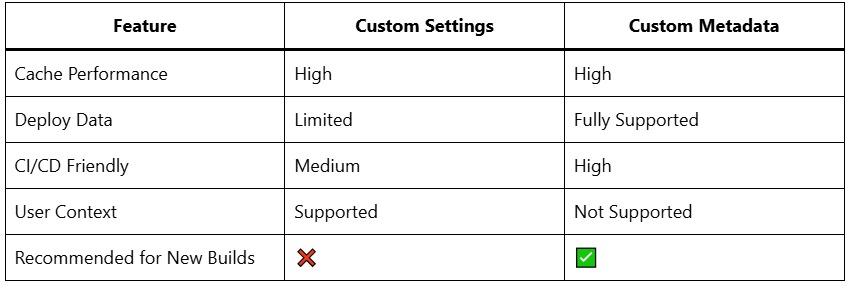
This comparison highlights why many teams are gradually migrating to Custom Metadata.
Common Errors During Custom Settings Deployment
Some frequently encountered issues include:
- Missing custom setting records after deployment
- Overwritten production values
- Apex
null pointerexceptions - Incorrect hierarchy resolution
Most of these can be avoided by following Salesforce custom settings migration best practices.
Key Takeaway:
Understanding how to deploy custom settings in Salesforce is essential for maintaining stable and scalable Salesforce applications. While Salesforce provides multiple deployment options including deploy custom settings using change sets, Metadata API, and data tools each method has its strengths and limitations.
By carefully separating metadata from data, choosing the right deployment method, and following proven Salesforce custom settings deployment best practices, teams can ensure smoother releases and fewer production issues.
As Salesforce development continues to evolve, consider using Custom Metadata Types for new configurations while continuing to manage Custom Settings responsibly in legacy implementations.