

How to Build Advanced n8n Workflows in 2026
In 2026, n8n has evolved from a simple automation tool into a sophisticated “orchestrator” capable of managing complex AI agents, high-volume data pipelines, and enterprise-grade business processes. Building advanced workflows today requires moving beyond linear “trigger-action” logic and embracing modular, event-driven, and AI-native architectures.
This guide explores the architectural shifts and advanced techniques necessary to master n8n in 2026.
Table of Contents
1. The Shift to Modular Architecture: Sub-workflows and Reusability
The biggest mistake in advanced automation is building “monolithic” workflows single, massive canvases with hundreds of nodes. These are difficult to debug, slow to load, and impossible to maintain.
Why Modularize?
In 2026, the standard practice is to break complex logic into sub-workflows using the Execute Workflow node. This approach offers several advantages:
- Reusability: Create a “Send Slack Notification” or “Clean CRM Data” sub-workflow once and call it from ten different parent workflows.
- Isolation: If a specific logic path fails, it doesn’t necessarily crash the entire parent process.
- Testing: You can test a 5-node sub-workflow much faster than a 50-node master flow.
Implementation Tip
When passing data to a sub-workflow, use a Set node immediately before the call to structure the input. This creates a “contract” between the parent and child, ensuring the sub-workflow always receives the exact variables it expects.
2. Orchestrating AI Agents and RAG Pipelines
By 2026, n8n has become the go-to platform for Agentic Workflows. Unlike traditional bots, these workflows use AI to decide which “tools” (nodes) to use based on the user’s intent.
Multi-Agent Orchestration
Advanced users now build multi-agent systems where one agent acts as a Manager and others act as Specialists.
- The Manager: Receives the initial prompt, identifies the goal, and routes it.
- The Researcher: Uses the HTTP Request node to scrape web data or query a vector database.
- The Writer: Summarizes the gathered data into a specific format.
Retrieval-Augmented Generation (RAG)
Integrating Vector Stores (like Pinecone or Weaviate) directly into n8n is now standard. An advanced workflow typically follows this pattern:
- Trigger: New document uploaded to Google Drive.
- Process: Use the AI Transformation node to chunk the text.
- Embed: Convert text to vectors using an embedding model (e.g., OpenAI or local Ollama).
- Upsert: Store in a vector database for future retrieval during chat-based workflows.
3. High-Volume Data Handling: Batching and Pagination
Handling “Big Data” in a low-code environment requires precision. In 2026, n8n’s SplitInBatches node and Queue Mode are essential for stability.
The Batching Strategy
When processing 10,000 rows from a database, never attempt to process them all at once. This leads to memory exhaustion. Instead:
- Fetch: Retrieve the full dataset (or a large chunk).
- Loop: Use SplitInBatches to process 50 items at a time.
- Iterate: At the end of the batch, loop back to the Split node until all data is handled.
Pagination in APIs
Most modern APIs use pagination. To build an advanced n8n workflow for this:
- Use a Loop that checks if a
next_page_tokenexists in the API response. - If it does, the workflow calls the API again with that token.
- If not, the workflow proceeds to the next stage.
4. Advanced Error Handling and Resilience
In 2026, “Set and Forget” is a myth. Professional workflows must be built to handle failure gracefully.
The Error Trigger Workflow
Instead of adding “On Error” logic to every node, create a dedicated Error Trigger workflow.
- Centralization: All failed executions across your entire n8n instance can trigger this one workflow.
- Logic: The error flow can log the failure to an internal dashboard, send an urgent alert to the developer, and even attempt a “Self-Healing” restart if the error is a temporary timeout.
Wait and Retry Logic
For flaky third-party APIs, implement a Wait node combined with a Switch node.
- If an API call fails, increment a “retry_count” variable.
- If
retry_count < 3, wait 60 seconds and try again. - If it fails a third time, escalate to the Error Workflow.
5. Security and Secret Management
As n8n moves further into the enterprise space in 2026, security is paramount. Advanced workflows should never have hardcoded API keys or sensitive data in the logs.
- Credential Management: Use n8n’s native credential system. If you are self-hosting, integrate with HashiCorp Vault or AWS Secrets Manager.
- Data Masking: In the node settings, use the “Hide Input/Output” feature for nodes that handle PII (Personally Identifiable Information) to ensure sensitive data isn’t stored in the execution history.
- Environment Variables: Use expressions like
{{ $env["ENVIRONMENT"] }}to switch between “Staging” and “Production” databases automatically.
6. Performance Optimization and Hosting
To run advanced workflows at scale, your infrastructure must match your logic.
Queue Mode and Workers
For high-concurrency environments, n8n should be deployed in Queue Mode.
- Main Instance: Handles the UI and workflow editing.
- Worker Instances: Multiple separate containers that execute the actual tasks.This allows you to scale horizontally; if your automations are slow, you simply add more “Workers.”
Expression Optimization
In 2026, complex logic should be handled in a Code Node (JavaScript/Python) rather than dozens of nested expressions in a Set node. Native code executes faster and is easier to read for other developers.
Pro Tip: Use the Wait node strategically to avoid hitting API rate limits. Instead of a fixed 1-second wait, calculate a “Jitter” (randomized wait time) to prevent your automated traffic from looking like a bot attack.
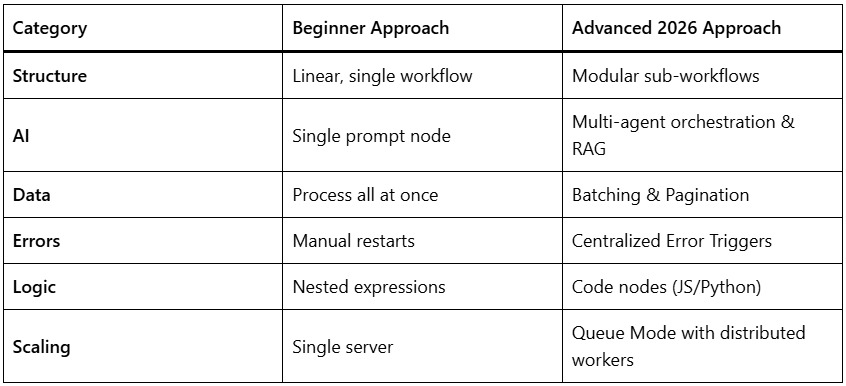
Summary of Advanced Techniques 2026
Conclusion
Building advanced n8n workflows in 2026 is an exercise in Systems Engineering. By shifting toward modularity, implementing robust error handling, and leveraging agentic AI, you can create automations that are not only powerful but also scalable and resilient. The goal is no longer just to “connect two apps,” but to build a self-sustaining ecosystem of digital processes.